In short
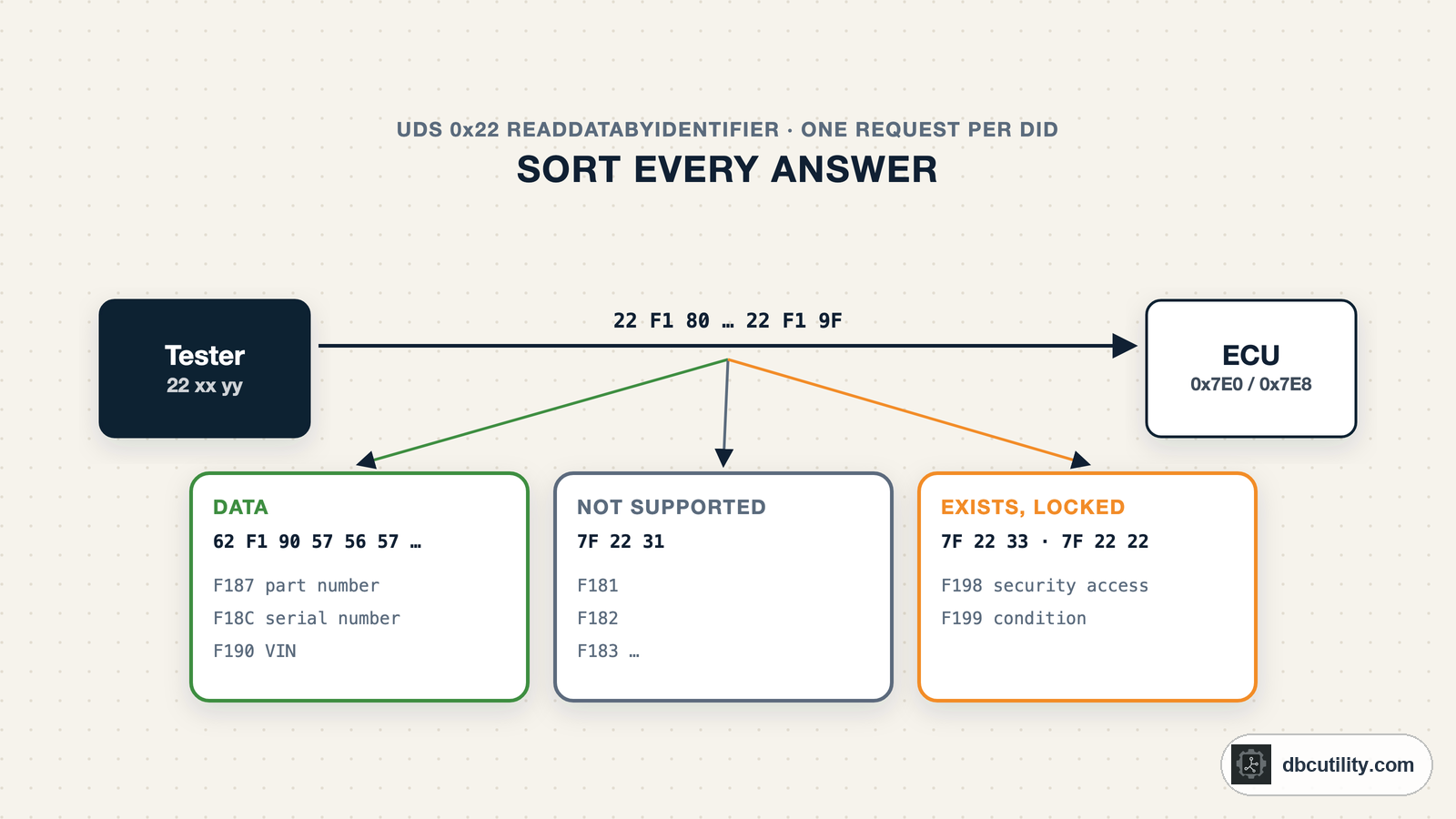
Find each ECU's request and response IDs, then send 22 xx yy for every DID. A 62 reply means data, 7F 22 31 means the DID does not exist in this session, and 7F 22 33 means it exists but is locked. Scan the identification range first, then watch the interesting DIDs while you change one thing.
Best for: Engineers reverse engineering ECUs, building diagnostic tools, or looking for data that OBD-II does not provide
OBD-II only covers emissions data. Everything else an ECU knows, such as cell voltages in a battery pack, the odometer stored in the instrument cluster or the software version of a door module, is behind manufacturer data identifiers (DIDs). You read them with UDS service 0x22, ReadDataByIdentifier. The manufacturer has the list. You usually do not, so you scan.
If UDS is new to you, read what UDS is first. This guide assumes you know a request, a positive response and a negative response.
One request, three kinds of answer
22 F1 90                 request: read DID 0xF190 (VIN)
62 F1 90 57 56 57 ...    positive response: 0x22 + 0x40, the DID, then the data
7F 22 31                 negative response: service 0x22 rejected with code 0x31
A scan is this exchange repeated for every DID. The negative response codes (NRCs) are what make it useful, because they tell you more than "no":
| Reply | Name | What it tells you |
|---|---|---|
62 .. | Positive response | The DID exists. The data follows the DID bytes |
7F 22 31 | requestOutOfRange | The DID is not supported, or not supported in the active session |
7F 22 33 | securityAccessDenied | The DID exists, but needs security access first |
7F 22 22 | conditionsNotCorrect | The DID exists, but a condition is not met, for example the engine must be running |
7F 22 13 | incorrectMessageLengthOrInvalidFormat | The request is malformed |
7F 22 14 | responseTooLong | The answer does not fit the transport |
7F 22 78 | responsePending | The ECU is still working; wait for the real answer |
7F 22 7F | serviceNotSupportedInActiveSession | Switch session and try again |
7F 22 11 | serviceNotSupported | This ECU does not offer service 0x22 |
| nothing | Wrong IDs, the ECU is asleep, or the request was not received |
33 and 22 are as interesting as data: they prove a DID exists.
Step 1: find the ECUs
You need each ECU's request ID and response ID. OBD-II gives you only the emissions ECUs, at 0x7E0–0x7E7. Others use manufacturer IDs.
TesterPresent (3E 00) is a safe probe: it does nothing except answer 7E 00. Send it to each 11-bit ID and see who answers. Start with 0x700–0x7F7, the range around OBD's own diagnostic IDs:
import time

import can


def find_ecus(bus, first=0x700, last=0x7F7, skip=(), wait=0.05):
    """Send TesterPresent (3E 00) to each 11-bit ID and list the IDs that answer 7E 00."""
    found = []
    for request_id in range(first, last + 1):
        if request_id in skip:  # IDs that already carry normal traffic
            continue
        bus.send(can.Message(arbitration_id=request_id, is_extended_id=False,
                             data=[0x02, 0x3E, 0x00, 0, 0, 0, 0, 0]))
        deadline = time.monotonic() + wait
        while (remaining := deadline - time.monotonic()) > 0:
            msg = bus.recv(remaining)
            if msg and msg.data[:3] == bytes([0x02, 0x7E, 0x00]):
                found.append((request_id, msg.arbitration_id))
                break
    return found


with can.Bus(interface="socketcan", channel="can0") as bus:
    for request_id, response_id in find_ecus(bus, skip={0x710, 0x7A0}):
        print(f"request 0x{request_id:03X} -> response 0x{response_id:03X}")
On some vehicles, IDs in this range also carry normal application messages, and a probe frame on one of them reaches every ECU that listens to it. Record the idle bus with candump first and pass the IDs you see as skip. The sweep covers 248 IDs at 50 ms each, about 12 seconds. A result looks like this, with IDs that differ per vehicle:
request 0x7E0 -> response 0x7E8
request 0x7E1 -> response 0x7E9
request 0x720 -> response 0x728
The +8 pairing comes from OBD-II. Other ECUs use whatever pairing the manufacturer chose, so record the response ID you actually see. Vehicles with 29-bit diagnostic IDs often use ISO 15765-2 normal fixed addressing, 0x18DA<target><tester>, where you sweep the target byte instead.
Step 2: know where to look
ISO 14229-1 reserves DID ranges for specific uses. The 2020 edition defines, among others:
| Range | Use |
|---|---|
0100–A5FF, A800–ACFF, B000–B1FF, C000–C2FF, CF00–EFFF | Vehicle manufacturer specific |
F010–F0FF | Vehicle manufacturer specific |
F100–F17F, F1A0–F1EF | Manufacturer-specific identification |
F180–F19F | Standard identification, see below |
F1F0–F1FF | Supplier-specific identification |
F400–F5FF | OBD data defined by SAE J1979-DA |
F800–F8FF | OBD info types defined by ISO 15031-5 |
FD00–FEFF | System supplier specific |
FF00 | UDS version implemented in the ECU |
The standard identification DIDs are the quickest win, because the format is known:
| DID | Content |
|---|---|
F180 | Boot software identification |
F186 | Active diagnostic session |
F187 | Manufacturer spare part number |
F18A | System supplier identifier |
F18C | ECU serial number |
F190 | VIN |
F19E | ODX file identifier |
Scan F180–F19F first. Thirty-two requests tell you which supplier built the ECU, its part number and its software version, which is often enough to find public information about it.
Step 3: scan safely
A scan sends thousands of requests to a live ECU. Stick to services that only read:
10 03: change to the extended diagnostic session. Never10 02, the programming session.22 xx yy: read a DID.3E 80: TesterPresent with the "no response wanted" bit set, to keep the session open.
Do not send 2E (write), 31 (routine control), 11 (reset), 14 (clear DTCs), 28 (communication control) or 85 (DTC setting) while exploring. Scan with the vehicle parked and the engine off, and keep the battery charged during long scans.
Some DIDs only exist in the extended session, and requestOutOfRange also covers "not in this session". Scan once in the default session and once in the extended session.
How long a full scan takes
There are 65 536 DIDs. The time per DID depends on how the ECU answers:
| ECU behaviour | Time per DID | Full range |
|---|---|---|
Answers 7F 22 31 in 5 ms | 5 ms | about 5.5 minutes |
| Answers at the 50 ms P2 limit | 50 ms | about 55 minutes |
| Stays silent, scanner waits 150 ms | 150 ms | about 2.7 hours |
Scan the identification and manufacturer ranges first, and leave the full range for a run you can leave alone.
A Python DID scanner
This uses the Linux kernel's ISO-TP sockets from Python's standard library, so it needs no extra packages. Load the module with sudo modprobe can-isotp. The link class handles the 0x78 response-pending case: the ECU first says "wait", then sends the real answer within P2*, 5 seconds by default.
import socket
import time

NRC_NAMES = {
    0x11: "serviceNotSupported",
    0x13: "incorrectMessageLengthOrInvalidFormat",
    0x14: "responseTooLong",
    0x22: "conditionsNotCorrect",
    0x31: "requestOutOfRange",
    0x33: "securityAccessDenied",
    0x7F: "serviceNotSupportedInActiveSession",
}


class IsoTpLink:
    """UDS requests over a Linux ISO-TP socket, waiting through 0x78 response-pending answers."""

    def __init__(self, interface, request_id, response_id, p2=0.05, p2_star=5.0):
        self.sock = socket.socket(socket.AF_CAN, socket.SOCK_DGRAM, socket.CAN_ISOTP)
        self.sock.bind((interface, response_id, request_id))
        self.p2, self.p2_star = p2, p2_star

    def send(self, payload):
        self.sock.send(payload)

    def request(self, payload):
        self.sock.send(payload)
        timeout = self.p2 + 0.1  # P2 plus some slack for the bus and the OS
        while True:
            self.sock.settimeout(timeout)
            try:
                reply = self.sock.recv(4095)
            except socket.timeout:
                return None
            if reply[:1] == b"\x7f" and reply[2:3] == b"\x78":
                timeout = self.p2_star  # ECU is still working on it
                continue
            return reply
The scanner reads each DID once, sends TesterPresent every two seconds, and keeps everything that is not requestOutOfRange:
def classify(did, reply):
    if reply is None:
        return "no answer"
    if reply[:3] == bytes([0x62, did >> 8, did & 0xFF]):
        return "data"
    if len(reply) >= 3 and reply[0] == 0x7F and reply[1] == 0x22:
        return NRC_NAMES.get(reply[2], f"NRC 0x{reply[2]:02X}")
    return "unexpected"


def scan_dids(link, dids, keep_alive=2.0):
    """Read each DID once. Returns {did: (status, data)} for every DID that is not 'requestOutOfRange'."""
    found = {}
    last_tester_present = time.monotonic()
    for did in dids:
        if time.monotonic() - last_tester_present > keep_alive:
            link.send(bytes([0x3E, 0x80]))  # TesterPresent, no reply wanted
            last_tester_present = time.monotonic()
        reply = link.request(bytes([0x22, did >> 8, did & 0xFF]))
        status = classify(did, reply)
        if status != "requestOutOfRange":
            found[did] = (status, reply[3:] if status == "data" else b"")
    return found


def show(found):
    for did, (status, data) in sorted(found.items()):
        text = data.decode("ascii", "replace") if data and all(32 <= b < 127 for b in data) else ""
        print(f"{did:04X}  {status:<22} {data.hex(' '):<40} {text}")
Run it against the engine ECU:
link = IsoTpLink("can0", request_id=0x7E0, response_id=0x7E8)
reply = link.request(bytes([0x10, 0x03]))  # extended session; a positive answer starts with 50 03
print("session:", reply.hex(" ") if reply else "no answer")
show(scan_dids(link, range(0xF180, 0xF1A0)))  # identification DIDs first
Output from a test run against a simulated ECU:
F187  data                   50 4e 2d 34 37 31 31 2d 30 38 31 35      PN-4711-0815
F18A  data                   53 55 50 50 4c 49 45 52 30 31            SUPPLIER01
F18C  data                   30 30 30 30 31 32 33 34 35 36 37         00001234567
F190  data                   57 56 57 5a 5a 5a 31 4a 5a 58 57 30 30 30 30 30 31 WVWZZZ1JZXW000001
F195  data                   01 02 03
F198  securityAccessDenied
F199  conditionsNotCorrect
Five DIDs return data, and two more exist but refuse: one needs security access, one needs a condition to be met. Text DIDs print as ASCII; binary ones, like F195, need decoding.
Step 4: work out what the bytes mean
A DID that returns 01 50 0C 80 tells you nothing until you see which bytes move. Use the same method as for CAN signals: read the DID repeatedly while you change one thing, and watch which bytes follow.
def watch(link, did, seconds=30, interval=0.1):
"""Read one DID repeatedly and print its bytes whenever they change."""
previous = None
start = time.monotonic()
while time.monotonic() - start < seconds:
    reply = link.request(bytes([0x22, did >> 8, did & 0xFF]))
    if reply and reply[0] == 0x62:
        data = reply[3:]
        if data != previous:
            changed = [i for i, b in enumerate(data) if previous is None or i >= len(previous) or b != previous[i]]
            print(f"{time.monotonic() - start:6.2f} s  {data.hex(' ')}  changed bytes: {changed}")
            previous = data
    time.sleep(interval)
With a battery ECU, run watch(link, 0x2101, seconds=600) while the car charges. A byte that rises slowly with the charge level is a state-of-charge candidate. Then estimate its scale and offset against the value on the dashboard, exactly as in building a DBC from reverse-engineered CAN logs:
- Text: printable ASCII is usually a part number, version or name.
- Counters and timers: bytes that change on every read, whatever you do.
- Physical values: bytes that follow what you change. Check one-byte and two-byte combinations in both byte orders.
- Bit fields: a byte that changes by a single bit when you press a button or open a door.
CSS Electronics shows a worked example of finding the Nissan Leaf's state of charge.
When the scan finds nothing
| Symptom | What to check |
|---|---|
| No answer to TesterPresent anywhere | Bitrate, wiring, or the ECUs are behind a gateway that does not forward your requests |
Everything is requestOutOfRange | Try the extended session; also check that you are talking to the ECU you think you are |
Everything is 7F 22 7F | The ECU does not allow 0x22 in this session; change session first |
| The session drops after a few seconds | TesterPresent is not being sent, or not to the right ID |
Data DIDs return securityAccessDenied | They need service 0x27 security access, which uses a seed-key algorithm the manufacturer does not publish |
Frequently asked questions
What is a DID in UDS?
A data identifier: a two-byte number that names a piece of data in an ECU, such as 0xF190 for the VIN. Service 0x22 reads it and service 0x2E writes it. ISO 14229-1 defines some DIDs and reserves ranges for manufacturers and suppliers.
How do I find which DIDs an ECU supports?
Send 22 with every DID value and record the answers. A 62 reply means the DID exists and returned data; 7F 22 31 means it is not supported in the current session; 7F 22 33 or 7F 22 22 mean it exists but is locked or needs a condition.
Is DID scanning safe?
Reading is low risk when you only use services 0x10 (default or extended session), 0x22 and 0x3E, and the vehicle is parked. Do not send write, routine, reset or clear-DTC services while exploring.
Why does my UDS request return 7F 22 78?
0x78 is responsePending. The ECU has received the request and needs more time. Keep listening: the real answer should follow within P2*, which is 5 seconds by default.
References
DBC Utility
One desktop app for DBC files and CAN recordings.
One-time $34 · Windows & Linux · Files stay on your computer