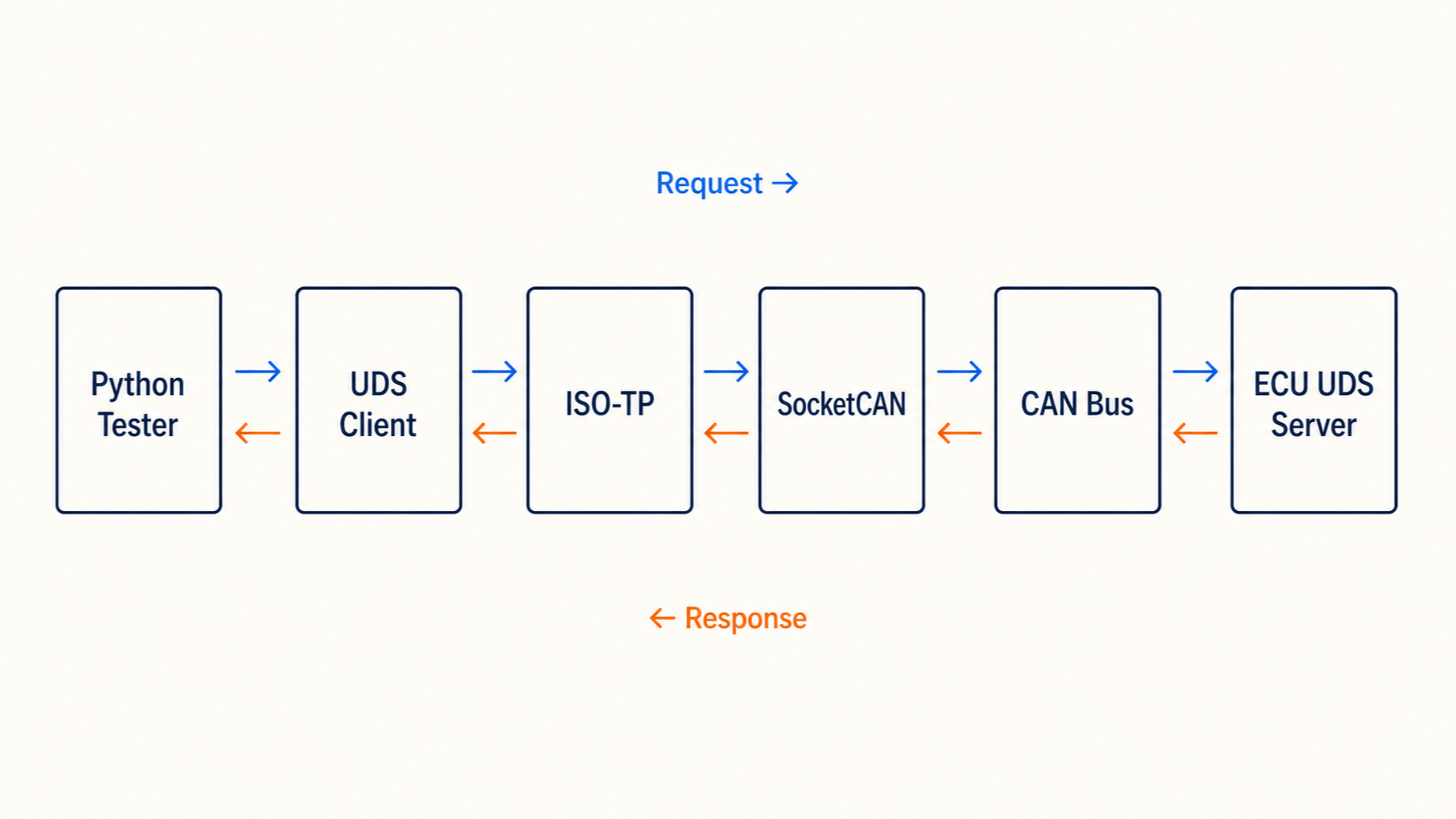
To implement UDS over CAN, connect a UDS client to an ISO-TP transport, give it the ECU's CAN addresses, and configure how to decode the data you request. A useful first test is reading the vehicle identification number (VIN): the request is short, but the reply is long enough to exercise ISO-TP segmentation.
This Python UDS tutorial uses udsoncan to build that test on Linux. You can use a real ECU or run the included responder on a virtual CAN interface. By the end, you should be able to explain both the printed VIN and the frames that carried it.
What CAN, ISO-TP, and UDS each do
The tester sends diagnostic requests; the ECU is the server that answers them. Three layers sit between your Python call and the ECU application:
| Layer | Job in this example | What you configure |
|---|---|---|
| CAN / SocketCAN | Sends and receives individual CAN frames | Interface, bitrate, and wiring |
| ISO-TP (ISO 15765-2) | Splits long messages, handles flow control, and reassembles them | Transmit and receive IDs, addressing, padding |
| UDS (ISO 14229) | Requests a data identifier and interprets the response | Service, DID codec, session, and timeouts |
For a VIN read, the UDS payload is 22 F1 90. Here, 22 means ReadDataByIdentifier and F1 90 selects DID 0xF190. These three bytes are not a complete raw CAN frame. ISO-TP adds its own length or segmentation bytes.
If the service names are new, read What is UDS? first. For the underlying bus setup, see how to use CAN bus.
Before you start: addresses and ECU requirements
Use a Linux machine with Python 3.10 or newer and a kernel that supports CAN ISO-TP sockets. Linux has included mainline ISO-TP support since 5.10, but your kernel configuration must enable it. This walkthrough uses IsoTPSocketConnection; it does not run directly against a Windows or macOS CAN interface.
For hardware, you also need a SocketCAN-compatible adapter, a powered ECU, and a correctly wired and terminated bench bus. Collect these settings from the ECU's diagnostic specification:
| Setting | Value used here | What to check on your ECU |
|---|---|---|
| Interface | can0 | Adapter's actual SocketCAN interface name |
| CAN bitrate | 500,000 bit/s | Must match the bus |
| Addressing | Normal, 11-bit, physical | Could instead be 29-bit or use an address extension |
| Tester transmit ID | 0x7E0 | ECU's diagnostic request ID |
| Tester receive ID | 0x7E8 | ECU's diagnostic response ID |
| Data identifier | 0xF190, 17 ASCII bytes | VIN support and read permissions |
| Session | Current/default session | Whether a session change or authorized access is required |
The IDs above are examples, not universal UDS addresses. Physical addressing targets one ECU. Do not substitute a functional broadcast ID and expect this one-to-one client to collect replies from several ECUs.
A VIN read also does not always require extended session 0x03. Start in the current/default session and follow the ECU specification if it requires something else.
Install the UDS Python libraries and bring up CAN
Create an environment and install the versions used for this walkthrough:
python3 -m venv .venv
source .venv/bin/activate
python -m pip install udsoncan==1.26.1 can-isotp==2.0.7
udsoncan builds and validates diagnostic messages. can-isotp provides the Python wrapper around the Linux ISO-TP socket. This particular connection does not need python-can; that package is used by the alternative user-space transport described later.
For a real adapter that already appears as can0, set the bitrate to match your bench:
sudo ip link set can0 down
sudo ip link set can0 type can bitrate 500000
sudo ip link set can0 up
ip -details -statistics link show can0
For a hardware-free test, create vcan0 instead. Virtual CAN needs no bitrate or physical adapter:
sudo modprobe vcan
sudo ip link add dev vcan0 type vcan
sudo ip link set vcan0 up
Run the ip link add command only once. If vcan0 already exists, just bring it up. A virtual interface does not emulate an ECU by itself: start the responder below before running the client.
Python UDS client: read VIN DID 0xF190
Save this as read_vin.py. It accepts an interface name so the same code works with the local responder and a configured bench ECU.
import argparse
import sys

import isotp
import udsoncan.configs
from udsoncan import AsciiCodec
from udsoncan.client import Client
from udsoncan.connections import IsoTPSocketConnection
from udsoncan.exceptions import (
    InvalidResponseException,
    NegativeResponseException,
    TimeoutException,
    UnexpectedResponseException,
)


def main():
    parser = argparse.ArgumentParser(description="Read a VIN using UDS over CAN")
    parser.add_argument("--interface", default="vcan0")
    parser.add_argument("--txid", type=lambda value: int(value, 0), default=0x7E0)
    parser.add_argument("--rxid", type=lambda value: int(value, 0), default=0x7E8)
    args = parser.parse_args()

    address = isotp.Address(
        isotp.AddressingMode.Normal_11bits,
        txid=args.txid,
        rxid=args.rxid,
    )
    config = udsoncan.configs.default_client_config.copy()
    config["data_identifiers"] = {0xF190: AsciiCodec(17)}
    # Example limits in seconds; use the ECU's specified timing on hardware.
    config["p2_timeout"] = 1.0
    config["p2_star_timeout"] = 5.0
    config["request_timeout"] = 10.0

    try:
        connection = IsoTPSocketConnection(args.interface, address)
        with Client(connection, config=config) as client:
            vin = client.read_data_by_identifier_first(0xF190)
            print(f"VIN: {vin}")
        return 0
    except NegativeResponseException as error:
        print(
            f"ECU rejected VIN read: {error.response.code_name} "
            f"(NRC 0x{error.response.code:02X})",
            file=sys.stderr,
        )
    except TimeoutException as error:
        print(f"UDS timeout: {error}", file=sys.stderr)
    except (InvalidResponseException, UnexpectedResponseException) as error:
        print(f"Invalid or mismatched UDS reply: {error}", file=sys.stderr)
    except OSError as error:
        print(f"Cannot use CAN/ISO-TP socket: {error}", file=sys.stderr)
    return 1


if __name__ == "__main__":
    raise SystemExit(main())
AsciiCodec(17) tells the client how many data bytes to consume and how to decode them. It does not make the ECU support that DID. For another identifier, use its specified length, byte order, scaling, and encoding.
On hardware, run:
python read_vin.py --interface can0 --txid 0x7E0 --rxid 0x7E8A successful read prints VIN: followed by the ECU's 17-character value. A failed read exits with status 1 and reports the reason. If the ECU needs extended session, add client.change_session(0x03) immediately before the read, inside the with block, after confirming that requirement.
Try it without an ECU: a local ISO-TP responder
Save this as vin_ecu.py. It is a small test fixture, not a production UDS server. It supports one DID and returns negative responses for unsupported services, malformed requests, and unknown DIDs. Both processes must run on the same Linux host with vcan0 up.
import socket

import isotp


VIN = b"WVWZZZ1JZXW000001"  # Synthetic 17-byte test value, not a real vehicle claim.
assert len(VIN) == 17


def respond(request):
    if not request:
        return None
    if request[0] != 0x22:
        return bytes([0x7F, request[0], 0x11])
    if len(request) != 3:
        return b"\x7f\x22\x13"
    if request[1:] != b"\xf1\x90":
        return b"\x7f\x22\x31"
    return b"\x62\xf1\x90" + VIN


def main():
    # From the ECU's perspective, transmit and receive IDs are reversed.
    address = isotp.Address(
        isotp.AddressingMode.Normal_11bits,
        txid=0x7E8,
        rxid=0x7E0,
    )
    transport = isotp.socket(timeout=0.5)
    try:
        transport.bind("vcan0", address)
        print("VIN test ECU listening on vcan0; press Ctrl+C to stop", flush=True)
        while True:
            try:
                request = transport.recv()
            except socket.timeout:
                continue
            if request is None:
                continue
            response = respond(request)
            if response is not None:
                transport.send(response)
    except KeyboardInterrupt:
        pass
    finally:
        transport.close()


if __name__ == "__main__":
    main()
In one terminal, activate the environment and start the responder:
source .venv/bin/activate
python vin_ecu.py
In a second terminal, from the same directory:
source .venv/bin/activate
python read_vin.py --interface vcan0
Expected output:
VIN: WVWZZZ1JZXW000001Stop the responder and run the client again. You should now get a timeout. That second check confirms that the result came from a request/reply exchange rather than a value printed unconditionally.
The fixture deliberately accepts only one DID per request. A full ReadDataByIdentifier implementation can support multiple DIDs; do not copy this length restriction into a general-purpose ECU server.
What the VIN exchange looks like on CAN
Install your Linux distribution's can-utils package and run this in a third terminal before making the request:
candump vcan0For the supplied VIN, a Classical CAN exchange using normal 11-bit addressing looks like this. These are illustrative frame bytes, with timestamps omitted; padding and flow-control settings may change the displayed frame lengths.
Direction       CAN ID   CAN data bytes
Tester -> ECU   7E0      03 22 F1 90
ECU -> Tester   7E8      10 14 62 F1 90 57 56 57
Tester -> ECU   7E0      30 00 00
ECU -> Tester   7E8      21 5A 5A 5A 31 4A 5A 58
ECU -> Tester   7E8      22 57 30 30 30 30 30 31
Read the trace in order:
03is the ISO-TP Single Frame length: three UDS bytes follow.10 14starts a First Frame announcing a 20-byte payload: service62, DIDF1 90, and 17 VIN bytes.30 00 00is Flow Control from the tester: continue, with no additional block boundary and no requested separation delay in this illustration.21and22mark Consecutive Frames with sequence numbers 1 and 2. Their remaining bytes finish the VIN.
The positive UDS response starts with 62, the positive-response SID for request service 22. The ISO-TP socket delivers the reassembled payload to udsoncan; you do not pass 10 14, 21, or 22 to the VIN codec.
If you see the First Frame but no Flow Control, investigate the tester's ISO-TP receive path and address settings. If Flow Control appears but the response stops halfway, inspect consecutive-frame timing and sequence errors. The candump guide covers capture commands in more detail.
Fix a timeout or negative response
A timeout means no acceptable complete response arrived within the configured timing. It does not tell you whether the fault is in wiring, transport, or the diagnostic service. Start with the trace.
| What you see | What to check next |
|---|---|
| Interface does not exist | Check the adapter driver and interface name with ip link show |
| ISO-TP socket reports protocol not supported | Check kernel CAN ISO-TP support; load can_isotp if supplied as a module |
| Requests appear, but no ECU frames | ECU power/wake state, bitrate, request ID, gateway routing, and wiring |
| CAN errors or bus-off | Fix the physical bus and bitrate before changing UDS timeouts |
| ECU frames appear, but the client times out | Receive ID, 11-bit versus 29-bit addressing, address extension, and ISO-TP flow control |
7F 22 31 | DID is not available under the ECU's current conditions; check the diagnostic specification |
7F 22 33 | Access is denied; use the project's authorized access procedure |
| Positive reply fails to decode | Check DID echo, actual data length, and codec; don't assume every DID is ASCII |
A negative response has the form 7F [request SID] [NRC]. For example, 7F 22 31 is a reply to ReadDataByIdentifier with NRC 0x31 (RequestOutOfRange). It proves the ECU received and handled the request far enough to reject it.
Other useful codes are 0x11 (ServiceNotSupported), 0x13 (IncorrectMessageLengthOrInvalidFormat), and 0x22 (ConditionsNotCorrect). Record the request, response bytes, session, and elapsed time so another engineer can reproduce the failure. Repeating a rejected request without changing its cause rarely helps.
P2, P2-star, and Response Pending
P2 controls how long the client waits for the first UDS response. After NRC 0x78 (ResponsePending), P2-star controls the next wait. udsoncan handles pending responses internally, while request_timeout still imposes an overall deadline. A pending response is not an instruction to resend the request.
The sample uses 1, 5, and 10 seconds respectively for a simple bench test. On hardware, use the ECU's timing requirements, including transport allowances. With use_server_timing enabled, supported session-control responses update P2/P2-star; the overall request limit still applies. See the client timing configuration.
Keep a diagnostic session alive with Tester Present
A non-default session can expire when the tester is idle. The service for keeping it active is Tester Present (3E 00), normally answered with 7E 00. Send it at an interval shorter than the ECU's specified S3 session timeout, allowing for scheduling and response time.
Use the documented client.tester_present() method. The pinned client does not provide start_tester_present() or stop_tester_present() helpers.
For example, inside an open client connection, this keeps an already selected session active during a short idle period. The one-second interval is only appropriate if the ECU's timing permits it:
import time

# Insert inside the Client context after any required session change.
for _ in range(5):
    client.tester_present()
    time.sleep(1.0)
This loop is for gaps between operations. It does not run while a blocking diagnostic request is in progress. The client is synchronous and handles one request at a time; a second thread issuing requests on the same client can interfere with replies. For a long-running routine, follow the ECU's specified pending-response and keepalive behavior and coordinate requests in one place.
What changes for a production ECU server?
The local responder demonstrates the boundary: ISO-TP supplies a complete request, a handler validates it, and ISO-TP transports the reply. An embedded implementation needs the same separation, plus integration with the ECU application.
Start with one read-only DID backed by real application data. Then add service/session permissions, session expiry, correct response timing, and the negative responses defined for each supported service. An empty payload has no request SID to echo; reject it at the appropriate boundary rather than inventing a diagnostic service number.
Before expanding to writes, routines, or flashing, test malformed requests, unsupported identifiers, multiple-DID behavior, transport interruption, pending responses, session changes, and resets. Programming additionally needs a bootloader design, memory validation, integrity checks, and recovery from interrupted updates. A VIN fixture is not a starting point for a flash loader without that work.
Common implementation questions
Can I use python-can instead of Linux ISO-TP sockets?
Yes. Use a python-can bus with isotp.NotifierBasedCanStack and udsoncan.connections.PythonIsoTpConnection. That moves ISO-TP into user space and allows supported vendor adapters, including on other operating systems. It changes transport setup and cleanup, not the UDS VIN request. See the official transport example.
Do I need a DBC file to read UDS data?
No. This client needs diagnostic identifiers and codecs from the ECU's diagnostic description. A DBC commonly describes broadcast CAN signals; it does not by itself supply UDS sessions, DID definitions, or access rules. DBC Utility can help inspect the broadcast database alongside your diagnostic work, while the UDS client handles the request/reply exchange.
Is reading VIN over UDS the same as OBD-II?
They can request similar information, but the service formats differ. This guide sends UDS 22 F1 90; it does not send an OBD-II Mode 09 PID 02 request. Shared example CAN IDs do not make the protocols interchangeable. See the OBD-II diagnostic example for that workflow.
Does this work with CAN FD or 29-bit IDs?
UDS can use those transports, but this code and trace target Classical CAN with normal 11-bit addressing. A 29-bit setup needs the matching ISO-TP addressing mode and IDs. CAN FD also needs compatible interface and ISO-TP link-layer settings. Match the ECU configuration before changing the sample.
References and next steps
Keep a successful VIN trace as your baseline. Add the next DID with its own codec, then check one expected rejection and one timeout before building a larger diagnostic workflow.
- Linux kernel ISO-TP documentation: socket behavior, addressing, and transport options.
- can-isotp socket documentation: Linux prerequisites and socket API.
- udsoncan client API: service calls, responses, and timing.
- udsoncan examples: DID codecs and alternative connections.
Use the applicable ISO 14229 and ISO 15765-2 editions and the ECU supplier's diagnostic specification for conformance decisions; library examples cover only part of an ECU implementation.