In short
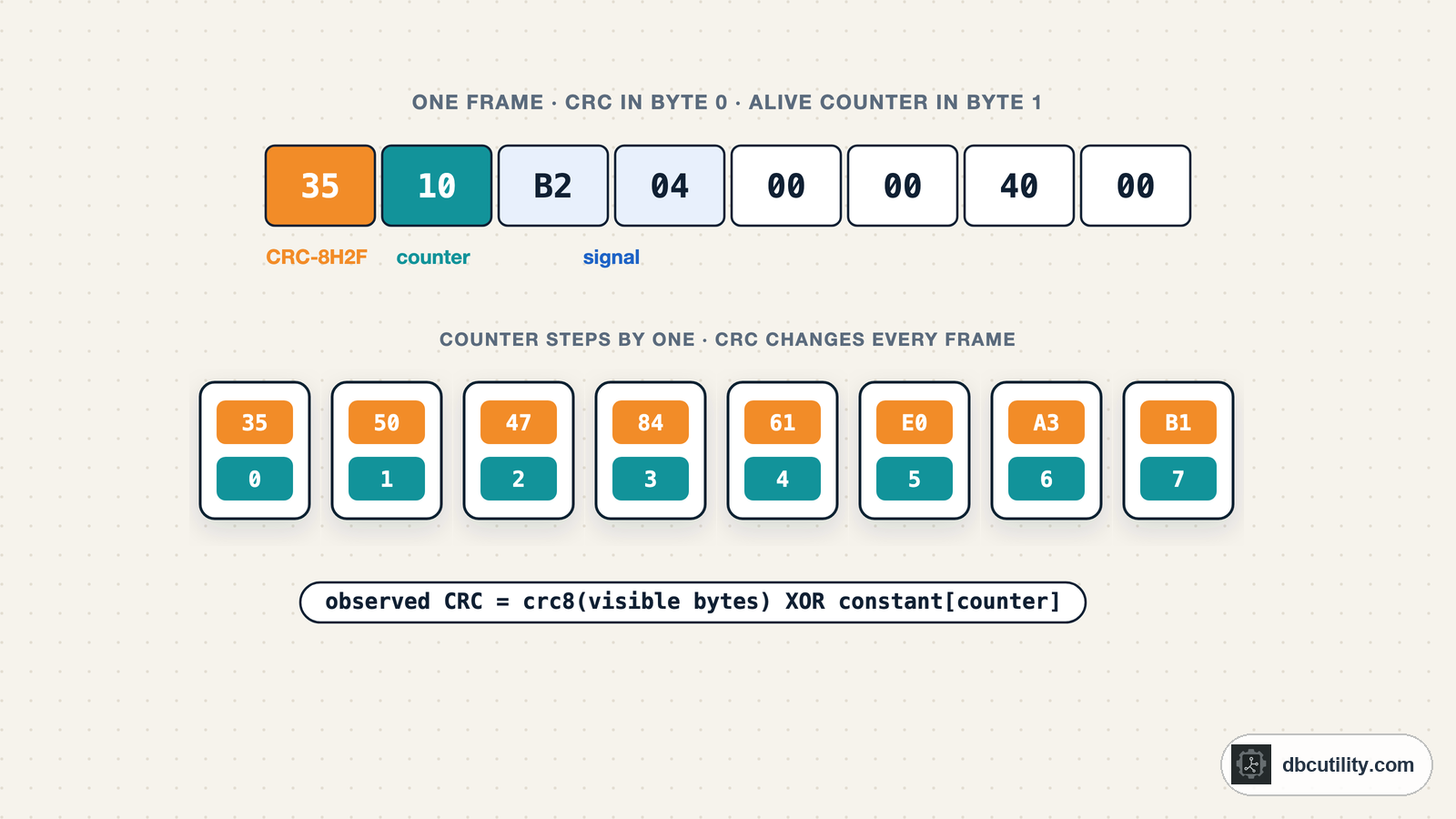
A counter steps by one each frame. A checksum or CRC changes whenever anything else changes. Test sums and XORs first, then search the 255 CRC-8 polynomials; the start value, final XOR and any hidden Data ID collapse into one constant per counter value.
Best for: Engineers reverse engineering CAN messages who need to understand or rebuild the counter and checksum bytes
You have found the byte that carries vehicle speed. You change it, send the frame, and the receiving ECU ignores it. Or your log shows one byte that looks like noise and a nibble that counts 0 to 15 forever. Those are the frame's protection fields: an alive counter and a checksum or CRC. Safety-relevant messages carry them so a receiver can detect lost, repeated or corrupted frames, and a frame with a wrong value is thrown away.
This guide shows how to find both from a log, and how to calculate a valid CRC for a frame you build yourself.
What they look like in a log
Six consecutive frames of one message:
35 10 B2 04 00 00 40 00
50 31 AE 04 00 00 40 00
47 32 B2 04 00 00 40 00
84 33 BE 04 00 00 40 00
61 34 B7 04 00 00 40 00
E0 15 B1 04 00 00 40 00- The low nibble of byte 1 counts
0, 1, 2, 3, 4, 5. That is the alive counter. - Byte 0 jumps around even when only one bit elsewhere changes. That is a checksum or CRC.
- Bytes 2 and 3 move slowly. That is the actual signal, here a speed value.
- The high nibble of byte 1 changes now and then. That is a status field.
These frames use the layout of AUTOSAR E2E Profile 2: CRC in byte 0, a 4-bit counter in the low nibble of byte 1, and a CRC-8H2F calculated over bytes 1 to 7 plus a hidden Data ID that depends on the counter. They are generated for this guide, so the right answer is known. Download all 48 frames as frames.txt to run the code below.
Find the counter
A counter steps by exactly one from each frame to the next and wraps around. Test every nibble and byte:
from pathlib import Path

FIELDS = (("low nibble", 0, 0x0F), ("high nibble", 4, 0x0F), ("byte", 0, 0xFF))


def counts_by_one(values, mask):
    for a, b in zip(values, values[1:]):
        if b != (a + 1) & mask and not (a == mask - 1 and b == 0):  # some counters skip the top value
            return False
    return True


def find_counters(frames):
    """Fields that step by +1 from each frame to the next, wrapping to 0."""
    found = []
    for index in range(len(frames[0])):
        for name, shift, mask in FIELDS:
            values = [(frame[index] >> shift) & mask for frame in frames]
            if len(set(values)) > 2 and counts_by_one(values, mask):
                found.append((index, name, shift, mask))
    return found


frames = [bytes.fromhex(line) for line in Path("frames.txt").read_text().split()]
for index, name, shift, mask in find_counters(frames):
    print(f"counter: byte {index}, {name}")
Output:
counter: byte 1, low nibbleUse consecutive frames of one CAN ID. A dropped frame in the log shows up as a step of 2, so filter the log to a single ID and check for gaps first. AUTOSAR E2E Profile 2 counts 0 to 15. Profile 1 counts 0 to 14 and skips 15, which is why the function accepts a jump from the second-highest value to 0. Other messages use a full byte.
Try simple checksums first
Many manufacturers use a plain sum or XOR, often with the CAN ID or length folded in. The open-source driver code in comma.ai's opendbc contains real examples:
| Brand in opendbc | Algorithm | Position |
|---|---|---|
| Toyota | Sum of the CAN ID bytes, the length and the data bytes, masked to 8 bits | Last byte |
| Honda | 4-bit sum of all nibbles of the CAN ID and data, subtracted from 8 | Low nibble of the last byte |
| Hyundai (some messages) | Plain sum of the first data bytes | One data byte |
You do not need to know what is folded in. If the ECU adds the CAN ID and length, they are the same in every frame of one message, so checksum − sum(other bytes) is constant. Test each position with each algorithm and look for a constant:
def find_simple_checksums(frames):
    """Test sum, XOR and nibble-sum checksums at every byte position.

    The constant absorbs anything fixed that the ECU adds, such as the CAN ID or the length.
    """
    found = []
    for pos in range(len(frames[0])):
        tests = {
            "sum": lambda f, rest: (f[pos] - sum(rest)) % 256,
            "xor": lambda f, rest: f[pos] ^ _xor(rest),
            "nibble sum, low nibble": lambda f, rest: ((f[pos] & 0x0F) + _nibbles(rest) + (f[pos] >> 4)) % 16,
        }
        for name, test in tests.items():
            constants = {test(f, [b for i, b in enumerate(f) if i != pos]) for f in frames}
            if len(constants) == 1:
                found.append((pos, name, constants.pop()))
    return found


def _xor(values):
    result = 0
    for value in values:
        result ^= value
    return result


def _nibbles(values):
    return sum((value >> 4) + (value & 0x0F) for value in values)


toyota_style = [bytes.fromhex(h) for h in (
    "0001EF000000009B", "000200000080012E", "00020E000080023D", "00020200000003B2",
    "0002050000800436", "0002170000800549", "00022100000006D4", "0002350000800769",
)]
print(find_simple_checksums(toyota_style))
print(find_simple_checksums(frames))
Output:
[(7, 'sum', 171)]
[]
The first message has a sum checksum in byte 7. Its constant, 171 (0xAB), is the length 8 plus the CAN ID bytes 0xA2 and 0x01. The second list is empty: the frames from the log above use something stronger.
How CRC-8 works, in one paragraph
A CRC treats the bytes as one long binary number and divides it by a fixed polynomial. The remainder is the CRC. A CRC-8 algorithm is fully described by the polynomial, the start value, the final XOR, and whether bits are processed in reversed order. Two algorithms appear in vehicles again and again:
| Name | Polynomial | Start | Final XOR | Check value for 123456789 |
|---|---|---|---|---|
| CRC-8/SAE-J1850 | 0x1D | 0xFF | 0xFF | 0x4B |
| CRC-8/AUTOSAR, also called CRC-8H2F | 0x2F | 0xFF | 0xFF | 0xDF |
The check values come from the CRC RevEng catalogue. Use them to test any implementation before trusting it:
def reflect8(value):
    return int(f"{value:08b}"[::-1], 2)


def crc8(data, poly, init=0x00, xor_out=0x00, reflect=False):
    """Bitwise CRC-8. reflect=True reverses input bytes and the result (refin = refout)."""
    crc = init
    for byte in data:
        crc ^= reflect8(byte) if reflect else byte
        for _ in range(8):
            crc = ((crc << 1) ^ poly) & 0xFF if crc & 0x80 else (crc << 1) & 0xFF
    return (reflect8(crc) if reflect else crc) ^ xor_out


print(hex(crc8(b"123456789", 0x1D, init=0xFF, xor_out=0xFF)))  # CRC-8/SAE-J1850
print(hex(crc8(b"123456789", 0x2F, init=0xFF, xor_out=0xFF)))  # CRC-8/AUTOSAR
Output:
0x4b
0xdf
Both appear in AUTOSAR's E2E protection. Profile 1 uses the 0x1D polynomial with start and final XOR set to 0x00, and includes a 16-bit Data ID in the CRC that, in most of its configuration modes, is not sent on the bus. Profile 2 uses CRC-8H2F, and its 8-bit Data ID is never sent: it is taken from a list of 16 values using the counter as the index, so the same payload gets a different CRC for each counter value.
Why you only need to search the polynomial
The hidden Data ID looks like it makes the CRC impossible to recover. It does not, because a CRC is linear: the CRC of two inputs XORed together is the XOR of their CRCs. Everything fixed that goes into the calculation, the start value, the final XOR and the Data ID, adds the same constant on top of the CRC of the visible bytes. For messages of one length:
observed CRC = crc8(visible bytes, start 0, final XOR 0) XOR constantWith a Data ID that changes with the counter, there is one constant per counter value. So the search only needs:
- the polynomial: 255 choices,
- the bit order: normal or reflected,
- whether hidden bytes come after the visible bytes: Profile 2 appends the Data ID, which shifts the result, so try 0, 1 and 2 trailing bytes.
That is 1 530 combinations, small enough for Python:
def find_crc8(frames, crc_byte, counter=None, max_trailing=2):
    """Search every CRC-8 polynomial for the byte at crc_byte.

    Start value, final XOR and any hidden Data ID end up in one constant per counter
    value, so only the polynomial, the bit order and the number of hidden bytes that
    follow the data ("trailing") need searching.
    """
    hits = []
    for poly in range(1, 256):
        for reflect in (False, True):
            for trailing in range(max_trailing + 1):
                constants = {}
                for frame in frames:
                    covered = frame[:crc_byte] + frame[crc_byte + 1:] + bytes(trailing)
                    key = (frame[counter[0]] >> counter[2]) & counter[3] if counter else None
                    constant = frame[crc_byte] ^ crc8(covered, poly, reflect=reflect)
                    if constants.setdefault(key, constant) != constant:
                        break
                else:
                    hits.append({"poly": poly, "reflect": reflect, "trailing": trailing, "constants": constants})
    return hits


counter = find_counters(frames)[0]  # (byte 1, low nibble, shift 0, mask 0x0F)
for hit in find_crc8(frames, crc_byte=0, counter=counter):
    print(f"poly 0x{hit['poly']:02X}  reflect={hit['reflect']}  trailing bytes={hit['trailing']}  "
          f"constants for {len(hit['constants'])} counter values")
Output:
poly 0x2F reflect=False trailing bytes=1 constants for 16 counter valuesOne combination fits every frame: polynomial 0x2F, normal bit order, one hidden byte after the data, and a separate constant for each of the 16 counter values. That matches the Profile 2 layout the frames were built with. You do not learn the Data ID values themselves, but you do not need them.
Calculate the CRC for your own frame
The 16 constants are enough to produce a valid CRC for any payload of the same message. Check the result on frames the search has not seen:
def make_crc(frame, crc_byte, counter, hit):
    """CRC for a frame you built yourself, using a hit from find_crc8."""
    covered = frame[:crc_byte] + frame[crc_byte + 1:] + bytes(hit["trailing"])
    key = (frame[counter[0]] >> counter[2]) & counter[3] if counter else None
    return crc8(covered, hit["poly"], reflect=hit["reflect"]) ^ hit["constants"][key]


training, check = frames[:32], frames[32:]
hit = find_crc8(training, crc_byte=0, counter=counter)[0]
correct = sum(make_crc(f, 0, counter, hit) == f[0] for f in check)
print(f"{correct} of {len(check)} unseen frames match")
Output:
16 of 16 unseen frames matchThe search ran on the first 32 frames, two per counter value, and correctly predicted the CRC of the remaining 16. An 8-bit CRC matches a random byte 1 time in 256, so always confirm a hit on fresh frames like this before you rely on it. Collect at least a few frames for every counter value; a counter value with no frames has no constant.
The Volkswagen MQB code in opendbc works the same way: CRC-8H2F with start and final XOR 0xFF, calculated over the data after the CRC byte, with a 16-entry table of per-message constants indexed by the counter.
Using CRC RevEng instead
CRC RevEng is a command-line tool that searches CRC parameters from samples. Put each message with its CRC at the end, as one hex string:
reveng -w 8 -s 10b2040000400035 30be040000400092 30ef0400004000a5These are three frames from the log above with counter value 0, rearranged so the CRC byte comes last. RevEng prints a matching model as width=8 poly=... init=... refin=... refout=... xorout=.... Its manual says it needs at least four data points, counting known parameters and samples, and that a result is a search hit, not proof.
RevEng expects one fixed algorithm across all samples, so with a Profile 2 style CRC give it frames with a single counter value. For one message length, a hidden Data ID then behaves like a different start value, which means the init and xorout RevEng reports can differ from the real ones while still producing correct CRCs.
Put them in the DBC
Name the fields so nobody mistakes them for signals. For the example message:
BO_ 1234 Speed_Example: 8 ECU_A
SG_ Speed_CRC : 0|8@1+ (1,0) [0|255] "" Vector__XXX
SG_ Speed_Counter : 8|4@1+ (1,0) [0|15] "" Vector__XXX
SG_ Speed_Status : 12|4@1+ (1,0) [0|15] "" Vector__XXX
SG_ Vehicle_Speed : 16|16@1+ (0.01,0) [0|655.35] "km/h" Vector__XXX
Add a comment with what you found, for example the polynomial and the counter range. Tools that send frames from a DBC, such as restbus simulations, need this to fill the fields in correctly.
Common mistakes
| Mistake | What happens |
|---|---|
| Mixing frames of two CAN IDs | No counter steps cleanly and no CRC fits |
| Using too few frames | Several polynomials fit by chance. Check on unseen frames |
| Leaving the counter out of the CRC search | A Profile 2 style CRC never fits, because the constant changes with the counter |
| Assuming the CRC covers all other bytes | Some messages cover only part of the payload. Try fewer bytes if nothing fits |
| Searching messages of different lengths together | The constant depends on the length. Search one length at a time |
Frequently asked questions
What is an alive counter in a CAN message?
A small field, usually 4 bits, that increases by one in every frame of a message and wraps from 15 back to 0. A receiver that sees the same value twice, or a jump, knows a frame was repeated or lost.
What is the difference between a checksum and a CRC in CAN messages?
A checksum is usually a sum or XOR of the payload bytes. A CRC divides the payload by a polynomial and is much better at detecting errors. In vehicles, both are often extended with the CAN ID, the length or a hidden Data ID.
Why does the ECU ignore my modified CAN frame?
If the message has a counter and a CRC, the receiver checks both. A frame with a stale counter or a CRC that does not match its payload is discarded. Recalculate the CRC and continue the counter sequence.
Do I need the AUTOSAR Data ID to calculate an E2E CRC?
No. For messages of one length, the Data ID only adds a constant per counter value. Recover those constants from captured frames, as shown above, and you can calculate a valid CRC without knowing the Data ID.
References
DBC Utility
One desktop app for DBC files and CAN recordings.
One-time $34 · Windows & Linux · Files stay on your computer