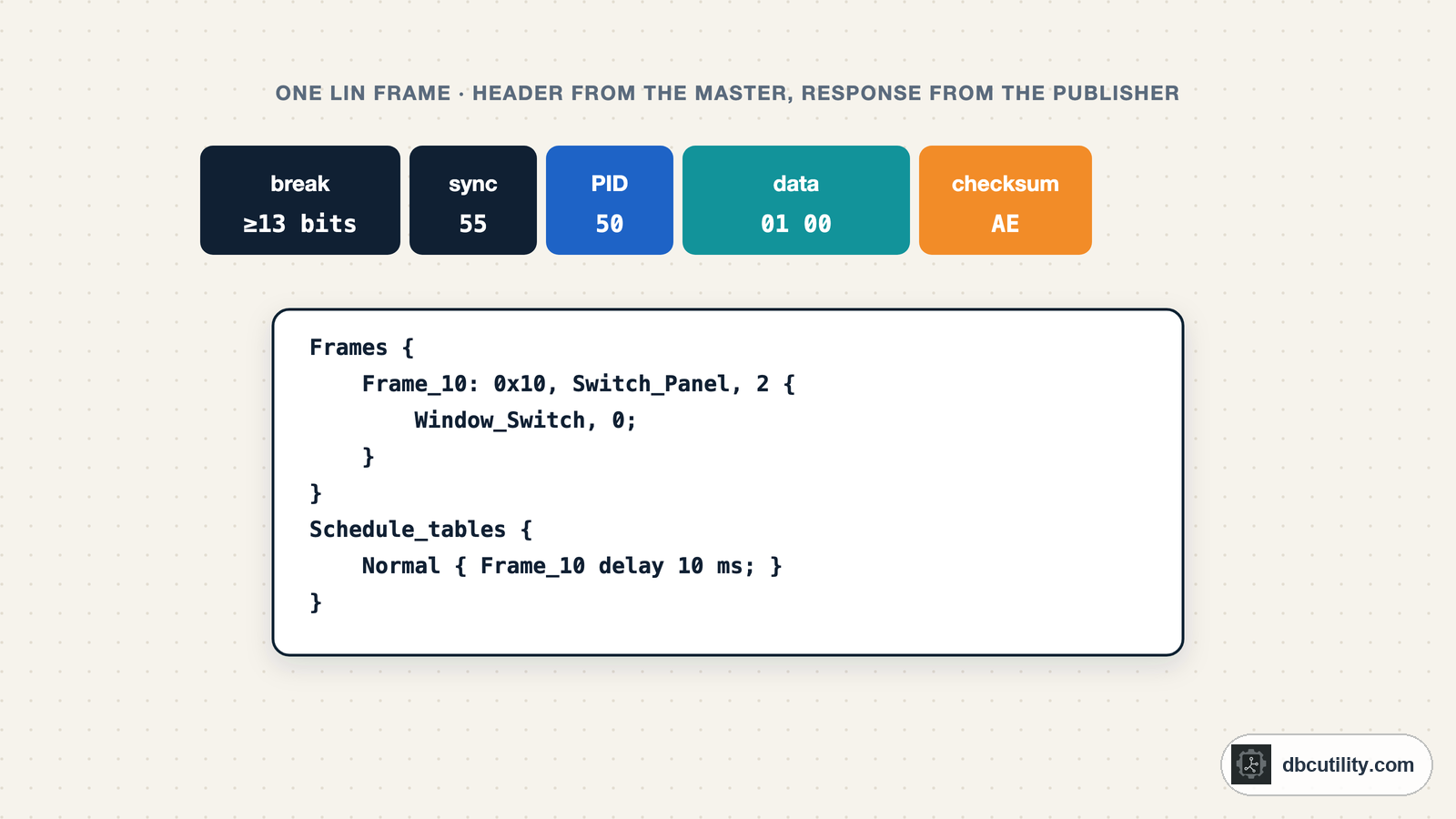
In short
Use a LIN transceiver, never a bare UART, because the bus runs at battery voltage. Every frame has a protected ID you can check with two parity bits and a checksum you can test as classic or enhanced. The master's schedule repeats, so its order and timing give you the schedule table. Who sends each response needs a test, not a sniffer.
Best for: Engineers reverse engineering body modules such as switch panels, mirrors, seats and wipers that sit on LIN
Window switches, mirror motors, seat modules and rain sensors often sit on LIN, a single-wire sub-bus behind a body ECU. The data you want, which button was pressed or where the mirror points, never appears on CAN in its raw form. To read it, you sniff the LIN line. The LIN for CAN engineers guide explains how LIN works; this guide is about decoding a LIN bus you have no documentation for.
Connecting safely
LIN is a single wire referenced to ground, with the bus level at battery voltage, about 12 V in a car. Never connect a microcontroller UART pin or a 3.3 V USB serial adapter directly; it will be damaged. Use:
- a LIN interface from a tools vendor, which also decodes frames and checksums, or
- a LIN transceiver chip between the bus and a UART, configured for the bus speed, typically 19.2 kbit/s, 8 data bits, no parity, 1 stop bit.
LIN bytes are ordinary UART characters sent least significant bit first. The frame starts with a break: at least 13 dominant bits, longer than any normal character. A UART sees it as a 0x00 with a framing error, which is how sniffers find the start of each frame.
What a frame looks like
| Field | Size | Sent by |
|---|---|---|
| Break and break delimiter | ≥ 13 bits dominant, then recessive | Master |
| Sync | 0x55 | Master |
| Protected ID | 6-bit frame ID + 2 parity bits | Master |
| Data | 1 to 8 bytes | The node that publishes this frame |
| Checksum | 1 byte | The same node |
The master sends every header. The response, data and checksum, comes from whichever node owns that frame: a slave for status frames, or the master itself for command frames. On the wire both look the same.
Check the protected ID and the checksum
The two top bits of the protected ID are parity bits over the 6-bit ID:
P0 = ID0 xor ID1 xor ID2 xor ID4
P1 = not (ID1 xor ID3 xor ID4 xor ID5)
The checksum is an 8-bit sum with carry, inverted. When the running sum goes above 255, 255 is subtracted. Two models exist:
- Classic (LIN 1.x): over the data bytes only.
- Enhanced (LIN 2.x): over the protected ID and the data bytes.
Diagnostic frames 0x3C and 0x3D always use the classic checksum.
def protected_id(frame_id):
    """6-bit frame ID plus parity bits P0 (bit 6) and P1 (bit 7)."""
    bit = [(frame_id >> i) & 1 for i in range(6)]
    p0 = bit[0] ^ bit[1] ^ bit[2] ^ bit[4]
    p1 = 1 - (bit[1] ^ bit[3] ^ bit[4] ^ bit[5])
    return frame_id | p0 << 6 | p1 << 7


def lin_checksum(data, pid=None):
    """Classic checksum over the data; enhanced if the protected ID is given. Sum with carry, inverted."""
    total = pid or 0
    for byte in data:
        total += byte
        if total > 0xFF:
            total -= 0xFF
    return ~total & 0xFF


for frame_id in (0x00, 0x01, 0x10, 0x20, 0x3C, 0x3D):
    print(f"ID 0x{frame_id:02X} -> protected ID 0x{protected_id(frame_id):02X}")
print(f"classic  0x{lin_checksum(bytes([0x4A, 0x55, 0x93, 0xE5])):02X}")
print(f"enhanced 0x{lin_checksum(bytes([0x4A, 0x55, 0x93, 0xE5]), protected_id(0x10)):02X}")
Output:
ID 0x00 -> protected ID 0x80
ID 0x01 -> protected ID 0xC1
ID 0x10 -> protected ID 0x50
ID 0x20 -> protected ID 0x20
ID 0x3C -> protected ID 0x3C
ID 0x3D -> protected ID 0x7D
classic  0xE6
enhanced 0x96
0x3C (master request) and 0x3D (slave response) are the diagnostic frames; IDs 0x3E and 0x3F are reserved. A protected ID that fails the parity check means a corrupted header or that you are not decoding at the right bit rate.
Analyse a capture
A sniffer log, one frame per line with the time, protected ID, data and checksum (download the 600-frame example):
0.000 50 00 00 AF
0.010 20 80 80 DE
0.020 11 30 00 FF FF BE
0.030 50 00 00 AF
For each frame ID, check the parity, find which checksum model fits every frame, and measure the period and how often each byte changes:
from collections import defaultdict


def load_capture(path):
    """Lines of 'time PID data... checksum' in hex, as a LIN sniffer writes them."""
    frames = []
    for line in open(path):
        fields = line.split()
        frames.append((float(fields[0]), int(fields[1], 16), bytes.fromhex("".join(fields[2:-1])), int(fields[-1], 16)))
    return frames


def analyse(frames):
    """Per frame ID: parity check, checksum model, length, period and byte change rate."""
    by_id = defaultdict(list)
    for t, pid, data, checksum in frames:
        by_id[pid & 0x3F].append((t, pid, data, checksum))
    report = {}
    for frame_id, items in sorted(by_id.items()):
        parity_ok = all(pid == protected_id(frame_id) for _, pid, _, _ in items)
        if all(lin_checksum(d, pid) == c for _, pid, d, c in items):
            model = "enhanced"
        elif all(lin_checksum(d) == c for _, _, d, c in items):
            model = "classic"
        else:
            model = "unknown"
        datas = [d for _, _, d, _ in items]
        rates = [sum(a[i] != b[i] for a, b in zip(datas, datas[1:])) / (len(datas) - 1) for i in range(len(datas[0]))]
        period = (items[-1][0] - items[0][0]) / (len(items) - 1) * 1000
        report[frame_id] = dict(parity_ok=parity_ok, checksum=model, length=len(datas[0]),
                                period_ms=round(period, 1), change_rate=[round(r, 3) for r in rates])
        print(f"ID 0x{frame_id:02X}: parity {'ok' if parity_ok else 'BAD'}, {model} checksum, "
              f"{len(datas[0])} bytes, every {period:.1f} ms, byte change rate {report[frame_id]['change_rate']}")
    return report


report = analyse(load_capture("lin_capture.txt"))
Output:
ID 0x10: parity ok, enhanced checksum, 2 bytes, every 30.0 ms, byte change rate [0.01, 0.0]
ID 0x11: parity ok, enhanced checksum, 4 bytes, every 30.0 ms, byte change rate [1.0, 0.0, 0.0, 0.0]
ID 0x20: parity ok, enhanced checksum, 2 bytes, every 30.0 ms, byte change rate [0.03, 0.0]
The checksum model tells you the LIN version: enhanced means LIN 2.x. The data length comes from the checksum position: the last byte before the next break is the checksum, and everything between the protected ID and it is data. Then read the change rates like a CAN survey: frame 0x11 byte 0 changes every time (a counter or a fast value), frame 0x10 byte 0 changes rarely (a switch), and frame 0x20 byte 0 changes in short bursts (a motor position while it moves).
Recover the schedule
Unlike CAN, LIN timing is not decided by the nodes. The master works through a schedule table, sending one header per slot, and repeats it. So the order and spacing of headers in the capture are the schedule. In the capture above the cycle is 0x10, 0x20, 0x11, one frame every 10 ms, each frame every 30 ms. A master can switch between schedule tables, for example a diagnostic schedule, so capture in every state you care about.
Write a starting LDF
An LDF (LIN Description File) is to LIN what a DBC is to CAN: nodes, signals, frames and schedule tables. This function writes one from the analysis, with one 8-bit placeholder signal per byte:
def make_ldf(report, frames, speed_kbps=19.2):
    """A starting LDF: one 8-bit signal per byte, the observed schedule, publishers still unknown."""
    order = []
    for _, pid, _, _ in frames:
        if pid & 0x3F in order:
            break
        order.append(pid & 0x3F)
    slot_ms = round((frames[1][0] - frames[0][0]) * 1000)
    signals, frame_defs = [], []
    for frame_id, info in report.items():
        layout = []
        for byte in range(info["length"]):
            name = f"F{frame_id:02X}_Byte{byte}"
            signals.append(f"    {name}: 8, 0, Unknown, Master;")
            layout.append(f"        {name}, {byte * 8};")
        frame_defs.append(f"    Frame_{frame_id:02X}: 0x{frame_id:02X}, Unknown, {info['length']} {{\n"
                          + "\n".join(layout) + "\n    }")
    schedule = "\n".join(f"        Frame_{i:02X} delay {slot_ms} ms;" for i in order)
    return f"""LIN_description_file;
LIN_protocol_version = "2.1";
LIN_language_version = "2.1";
LIN_speed = {speed_kbps} kbps;

Nodes {{
    Master: Master, {slot_ms} ms, 0.1 ms;
    Slaves: Unknown;
}}

Signals {{
{chr(10).join(signals)}
}}

Frames {{
{chr(10).join(frame_defs)}
}}

Node_attributes {{
    Unknown {{
        LIN_protocol = "2.1";
        configured_NAD = 0x01;
        product_id = 0x0000, 0x0000;
    }}
}}

Schedule_tables {{
    Observed {{
{schedule}
    }}
}}
"""


frames = load_capture("lin_capture.txt")
ldf_text = make_ldf(report, frames)  # report from the analysis above
open("observed.ldf", "w").write(ldf_text)
print(ldf_text)
The result starts like this, and the open-source ldfparser library parses it and decodes frames with it:
LIN_description_file;
LIN_protocol_version = "2.1";
LIN_language_version = "2.1";
LIN_speed = 19.2 kbps;

Nodes {
    Master: Master, 10 ms, 0.1 ms;
    Slaves: Unknown;
}pip install ldfparser
python3 -c "import ldfparser; ldf = ldfparser.parse_ldf(path='observed.ldf'); print(ldf.get_unconditional_frame('Frame_20').decode_raw(bytes([0x88, 0x80])))"That prints {'F20_Byte0': 136, 'F20_Byte1': 128}. For LIN 2.x files, ldfparser requires a Node_attributes block for every slave, and from 2.1 a product ID, so the function writes placeholder values there. Replace them, and the placeholder signals, as you learn what each byte means.
Who sends each response?
A passive sniffer cannot tell which node drove a response, because every node uses the same wire. To find out:
- Disconnect one slave and see which frames lose their response. The master still sends the header; the missing bytes belonged to that slave.
- Simulate the master on a bench with only one slave connected, and send headers for each ID. A slave answers only the frames it publishes.
- Look at the meaning. A frame whose bytes change when you press a switch on a panel is published by that panel. A frame that changes before a motor moves is a command from the master.
Then set the publisher of each frame in the LDF. Once you know which bits are which signal, split the 8-bit placeholders into real signals with their sizes and offsets, the same way as in a DBC.
Frequently asked questions
How do I sniff a LIN bus?
Connect a LIN interface, or a LIN transceiver feeding a UART, between the LIN wire and ground. Set it to the bus speed, usually 19.2 kbit/s. Never connect a logic-level UART directly, because the bus runs at battery voltage.
What is the difference between classic and enhanced LIN checksums?
The classic checksum (LIN 1.x) covers only the data bytes. The enhanced checksum (LIN 2.x) also includes the protected identifier. Both are an 8-bit sum with carry, inverted. Diagnostic frames 0x3C and 0x3D always use the classic checksum.
How do I calculate the LIN protected ID?
Take the 6-bit frame ID and add two parity bits: P0 = ID0 xor ID1 xor ID2 xor ID4 in bit 6, and P1 = not(ID1 xor ID3 xor ID4 xor ID5) in bit 7. ID 0x3C gives 0x3C and ID 0x3D gives 0x7D.
What is an LDF file?
The LIN Description File. It describes a LIN cluster's nodes, signals, frames and schedule tables, like a DBC file does for CAN. Tools use it to decode LIN traffic and to simulate the master.
References
DBC Utility
One desktop app for DBC files and CAN recordings.
One-time $34 · Windows & Linux · Files stay on your computer