In short
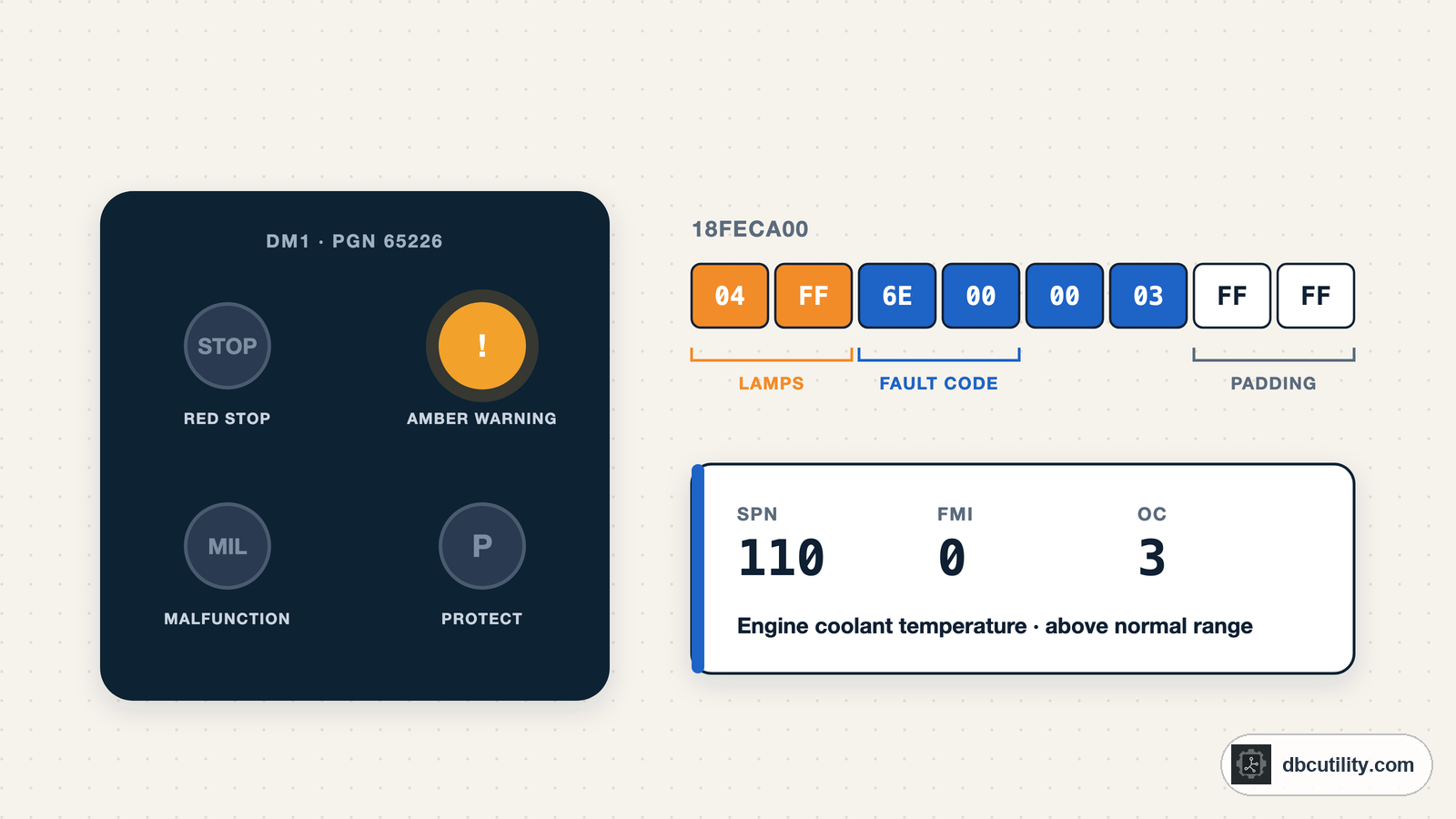
A DM1 message starts with two bytes of lamp status, followed by one 4-byte fault code per active fault. Each fault code holds a 19-bit SPN (what failed), a 5-bit FMI (how it failed), and a 7-bit occurrence count.
Best for: Engineers and technicians reading fault codes from trucks, buses, and off-highway machines over J1939
A truck shows an amber warning lamp, and your CAN log has a frame with the ID 18FECA00 every second. That frame is DM1, the J1939 message that lists active fault codes. This guide shows how to read it by hand and in Python.
Where DM1 sits
DM1 is defined in SAE J1939-73, the diagnostics part of J1939. Its PGN is 65226 (0xFECA). Every ECU that has diagnostics sends its own DM1, usually once per second, so the last byte of the CAN ID tells you which ECU is reporting:
18FECA00   -> DM1 from source address 0x00 (usually the engine)
18FECA03   -> DM1 from source address 0x03 (usually the transmission)
If you have not met PGNs and source addresses yet, start with what J1939 is and how a PGN is built.
The DM1 layout
A DM1 message has two parts: lamp status, then one fault code per active fault.
can0  18FECA00   [8]  04 FF 6E 00 00 03 FF FF
  |  |  |-----------| |---|
  |  |  fault code   padding
  |  lamp flash
lamp status| Bytes | Content |
|---|---|
| 1 | Lamp status: four 2-bit fields |
| 2 | Lamp flash: four 2-bit fields |
| 3–6 | First fault code (DTC) |
| 7–10, 11–14, … | More fault codes, if there are any |
With one fault, the message fits in 8 bytes and the last two bytes are FF. With two or more faults, the message is longer than 8 bytes, so it travels with the J1939 transport protocol.
Byte 1 and 2: the warning lamps
Each lamp gets two bits in byte 1 (on or off) and the same two bits in byte 2 (how it flashes):
| Bits | Lamp | SPN | Meaning |
|---|---|---|---|
| 8–7 | Malfunction indicator lamp (MIL) | 1213 | An emissions-related fault |
| 6–5 | Red stop lamp | 623 | Stop the vehicle |
| 4–3 | Amber warning lamp | 624 | A fault that does not need an immediate stop |
| 2–1 | Protect lamp | 987 | A problem in a non-electronic subsystem |
Status values in byte 1: 00 off, 01 on, 11 not available. Flash values in byte 2: 00 slow flash, 01 fast flash, 11 no flash.
In the example, byte 1 is 0x04 = 0000 0100. Bits 4–3 are 01, so the amber warning lamp is on and the other three are off. Byte 2 is 0xFF, so nothing flashes.
The lamps describe the ECU as a whole, not each fault. If one fault needs a red stop lamp, the red stop lamp is on, even if other active faults are minor.
Bytes 3–6: one fault code
A fault code (DTC) is 4 bytes with four fields:
| Field | Size | What it tells you |
|---|---|---|
| SPN | 19 bits | Which parameter or component has the fault |
| FMI | 5 bits | How it failed |
| CM | 1 bit | Conversion method; 0 in current J1939 |
| OC | 7 bits | How many times the fault has occurred |
The bits are packed like this:
byte 3: SPN bits 1–8
byte 4: SPN bits 9–16
byte 5: SPN bits 17–19 (top 3 bits) | FMI (low 5 bits)
byte 6: CM (top bit) | OC (low 7 bits)
For the example bytes 6E 00 00 03:
SPN = 0x6E | 0x00 << 8 | (0x00 >> 5) << 16 = 110
FMI = 0x00 & 0x1F                           = 0
OC  = 0x03 & 0x7F                           = 3
SPN 110 is engine coolant temperature. FMI 0 means the data is valid but above the normal operating range, at the most severe level. So the engine is reporting coolant that is too hot, seen three times.
When an ECU has no active faults, it still sends DM1, with the lamps off and the fault code bytes set to 00 00 00 00.
What the FMI numbers mean
The FMI is the same list for every SPN. The ones you will see most:
| FMI | Meaning |
|---|---|
| 0 | Data valid but above normal range, most severe |
| 1 | Data valid but below normal range, most severe |
| 2 | Data erratic, intermittent, or incorrect |
| 3 | Voltage above normal, or shorted to high |
| 4 | Voltage below normal, or shorted to low |
| 5 | Current below normal, or open circuit |
| 6 | Current above normal, or grounded circuit |
| 7 | Mechanical system not responding or out of adjustment |
| 8 | Abnormal frequency, pulse width, or period |
| 9 | Abnormal update rate |
| 12 | Bad intelligent device or component |
| 13 | Out of calibration |
| 14 | Special instructions |
| 15 | Data valid but above normal range, least severe |
| 16 | Data valid but above normal range, moderately severe |
| 17 | Data valid but below normal range, least severe |
| 18 | Data valid but below normal range, moderately severe |
| 19 | Received network data in error |
| 31 | Condition exists |
SPN numbers below 520192 are defined by SAE. Higher SPNs are proprietary, so you need the manufacturer's documentation to know what they mean.
Decode DM1 in Python
This function decodes the lamps and every fault code in a DM1 payload. It works for a single-frame DM1 and for the longer payload you get after reassembling a multi-packet DM1.
LAMP_STATUS = {0: "off", 1: "on", 2: "reserved", 3: "not available"}
LAMP_FLASH = {0: "slow flash", 1: "fast flash", 2: "reserved", 3: "no flash"}
LAMPS = ("protect", "amber warning", "red stop", "malfunction indicator")


def decode_dm1(data: bytes) -> dict:
    lamps = {}
    for index, lamp in enumerate(LAMPS):
        shift = index * 2
        lamps[lamp] = (LAMP_STATUS[(data[0] >> shift) & 0b11], LAMP_FLASH[(data[1] >> shift) & 0b11])

    faults = []
    for offset in range(2, len(data) - 3, 4):
        b1, b2, b3, b4 = data[offset:offset + 4]
        spn = b1 | (b2 << 8) | ((b3 >> 5) << 16)
        fmi = b3 & 0x1F
        if spn == 0 and fmi == 0:
            continue  # "no active faults" placeholder
        faults.append({"spn": spn, "fmi": fmi, "occurrences": b4 & 0x7F})
    return {"lamps": lamps, "faults": faults}


print(decode_dm1(bytes.fromhex("04FF6E000003FFFF")))
Output:
{'lamps': {'protect': ('off', 'no flash'), 'amber warning': ('on', 'no flash'),
'red stop': ('off', 'no flash'), 'malfunction indicator': ('off', 'no flash')},
'faults': [{'spn': 110, 'fmi': 0, 'occurrences': 3}]}
To pick DM1 frames out of a log, match the PGN, not the full CAN ID, so you see DM1 from every ECU:
def pgn_of(can_id: int) -> int:
    pdu_format = (can_id >> 16) & 0xFF
    pdu_specific = (can_id >> 8) & 0xFF if pdu_format >= 240 else 0
    return ((can_id >> 24) & 0x3) << 16 | pdu_format << 8 | pdu_specific


if pgn_of(can_id) == 65226 and len(data) == 8:
    print(f"ECU 0x{can_id & 0xFF:02X}:", decode_dm1(data))
A DM1 with two or more faults arrives as transport protocol frames instead. Reassemble those first; the transport protocol guide has a reassembler you can drop in front of decode_dm1.
DM1 versus DM2 and clearing faults
DM1 is only one of many J1939 diagnostic messages:
| Message | PGN | What it is for |
|---|---|---|
| DM1 | 65226 | Active faults, broadcast |
| DM2 | 65227 | Previously active faults, sent on request |
| DM3 | 65228 | Clear previously active faults |
| DM11 | 65235 | Clear active faults |
DM2 has the same layout as DM1. Clearing faults changes the ECU's state, so only do it on a vehicle you are responsible for, and only when the service procedure says so.
Common mistakes
- Reading the SPN from bytes 3 and 4 only. The top three bits sit in byte 5. SPNs above 65535 decode wrong if you skip them.
- Filtering on one CAN ID. Each ECU sends its own DM1. Filter on PGN 65226 to see all of them.
- Ignoring multi-packet DM1. If a vehicle has two active faults, there is no 8-byte DM1 frame at all, only transport protocol frames.
- Treating the lamps as per-fault. The lamp bits summarise the ECU, not each code.
Frequently asked questions
What is the difference between SPN and FMI?
The SPN says which parameter or component has a problem, for example SPN 110 for engine coolant temperature. The FMI says what kind of problem it is, for example FMI 0 for a value that is too high.
Why is my DM1 message longer than 8 bytes?
Because the ECU has more than one active fault. Each fault adds 4 bytes, so the DM1 is sent with the J1939 transport protocol and has to be reassembled before you decode it.
Is a J1939 DM1 code the same as an OBD-II code?
No. OBD-II uses five-character codes such as P0217. J1939 uses an SPN and FMI pair. Some heavy-duty emissions systems report both, but the formats are different.
References
DBC Utility
One desktop app for DBC files and CAN recordings.
One-time $34 · Windows & Linux · Files stay on your computer