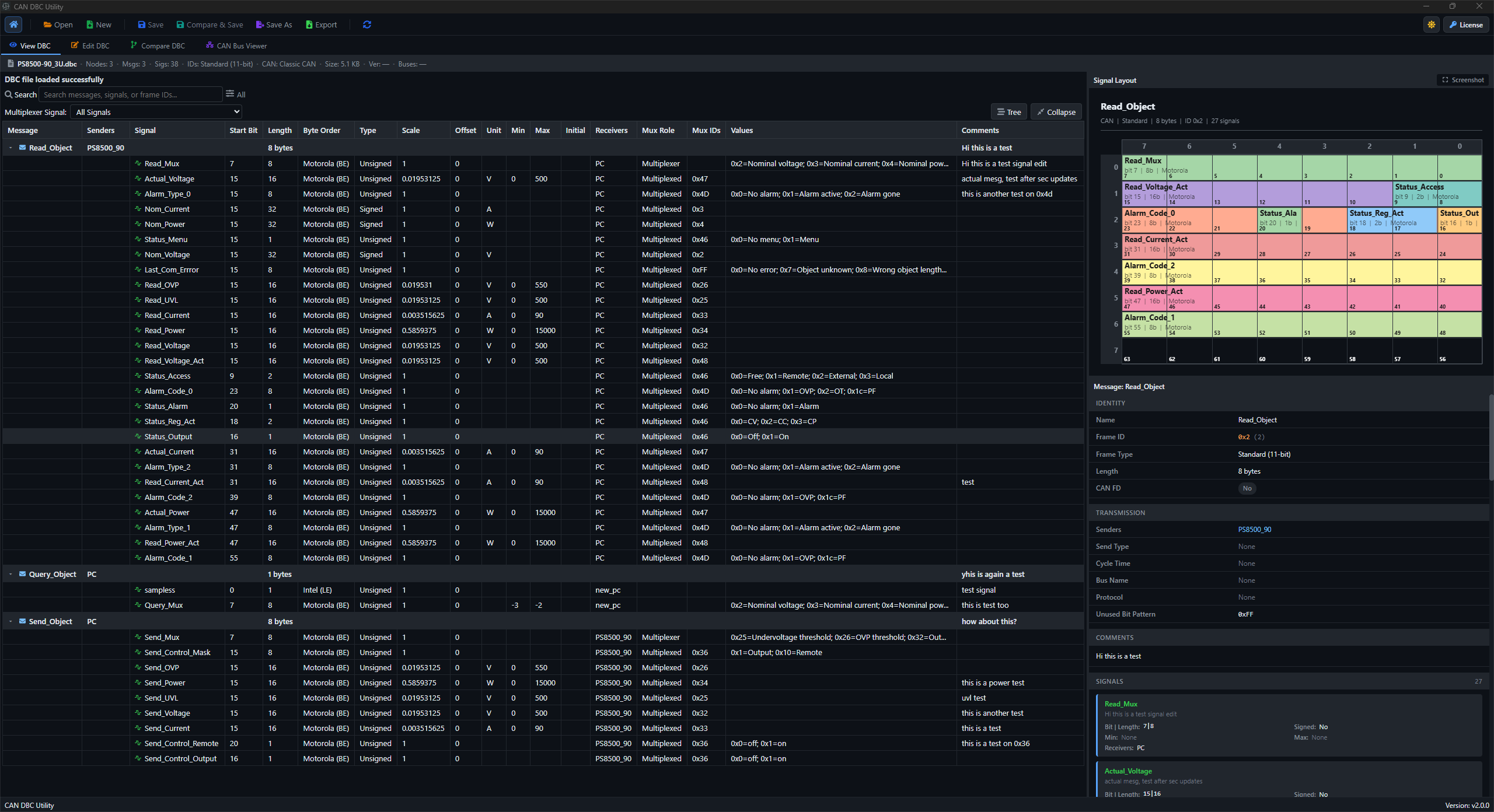
DBC viewer meaning
A DBC viewer is a tool that opens a DBC file and shows its CAN messages and signals in a readable way.
A DBC file is a text database. It can describe:
- CAN message names and IDs
- message lengths
- signal names
- start bits and signal lengths
- byte order
- signed or unsigned values
- scale and offset
- units
- transmitting and receiving ECUs
- value tables and comments
You can open a DBC in a text editor, but it becomes difficult to read as the file grows. A viewer organizes that information for engineering work.
What a DBC viewer does not do
A DBC viewer does not automatically connect to a live CAN bus. It reads the database definition, not necessarily live traffic.
This is an important difference:
DBC viewer -> shows how messages and signals are defined
CAN analyzer -> records, sends, filters, and studies bus traffic
Some large tools do both. A focused DBC viewer may only work with the database file.
A small DBC example
This simplified DBC message contains two signals:
BO_ 291 EngineData: 8 EngineECU
SG_ EngineSpeed : 0|16@1+ (0.25,0) [0|16000] "rpm" Dashboard
SG_ CoolantTemp : 16|8@1+ (1,-40) [-40|215] "degC" Dashboard
A DBC viewer turns that text into fields such as:
| Field | EngineSpeed |
|---|---|
| CAN ID | 291 decimal, or 0x123 |
| Start bit | 0 |
| Length | 16 bits |
| Byte order | Little-endian |
| Scale | 0.25 |
| Offset | 0 |
| Unit | rpm |
That is much faster to review than remembering every part of the DBC syntax.
Why engineers use a DBC viewer
Understand an unfamiliar CAN network
Search for a message or signal, inspect its ID, and see which ECU sends it.
Check signal decoding
Review bit position, byte order, scaling, offset, and signedness before blaming the software decoder.
Review a supplier file
Check whether names, units, comments, receivers, and message lengths are complete.
Inspect multiplexed messages
See which signals belong to each multiplexer value instead of reading many DBC lines manually.
Compare a log with the database
When a raw frame does not decode correctly, a viewer helps confirm whether the log and DBC use the same CAN ID and payload length.
How to use a DBC viewer
The exact buttons vary, but the workflow is normally simple:
- Open the
.dbcfile. - Select a message from the message list.
- Confirm the CAN ID and message length.
- Select a signal inside the message.
- Check start bit, length, byte order, scale, offset, and unit.
- Open the bit layout if the viewer provides one.
- Search for related messages or signals.
- Compare the definition with a known raw payload.
A decoding check you can do by hand
Suppose the first two bytes are 40 1F, the signal is little-endian, and the scale is 0.25.
payload = bytes.fromhex("40 1F 00 00 00 00 00 00")
raw = int.from_bytes(payload[0:2], byteorder="little")
physical = raw * 0.25

print(raw)       # 8000
print(physical)  # 2000.0
If the DBC viewer shows the same signal settings, the expected result is 2000 rpm.
What to look for in a DBC viewer
A useful viewer should make these tasks easy:
- search by message, signal, or frame ID
- switch between decimal and hexadecimal IDs
- see standard and extended frames clearly
- inspect CAN FD message lengths
- view signal bits inside the payload
- understand multiplexed signals
- read comments and value descriptions
- compare revisions when the database changes
DBC Utility as a DBC viewer
DBC Utility is a desktop DBC viewer and editor for Windows and Linux. It lets you browse messages and signals, search by name or frame ID, inspect file metadata, view bit layouts, work with multiplexed definitions, edit the file, and compare revisions.
For a viewing workflow:
- Open DBC Utility.
- Load the DBC file.
- Use the message tree to select a message.
- Select a signal to see its definition.
- Open the layout view when you need bit-level context.
See the DBC Viewer page and how-to-use guide for the current product workflow.
DBC viewer vs DBC editor
| DBC viewer | DBC editor |
|---|---|
| Reads and displays definitions | Changes definitions |
| Good for inspection | Good for database maintenance |
| Lower risk of accidental changes | Requires validation before saving |
Many tools combine both modes. If you only want to inspect a supplier file, avoid saving changes until you understand the database.
The simple summary
A DBC viewer makes CAN database files understandable. It shows which messages exist, where signals are stored, and how raw bits become engineering values. Use it before writing a decoder, reviewing a DBC change, or investigating why a CAN value looks wrong.