CANalyzer in simple words
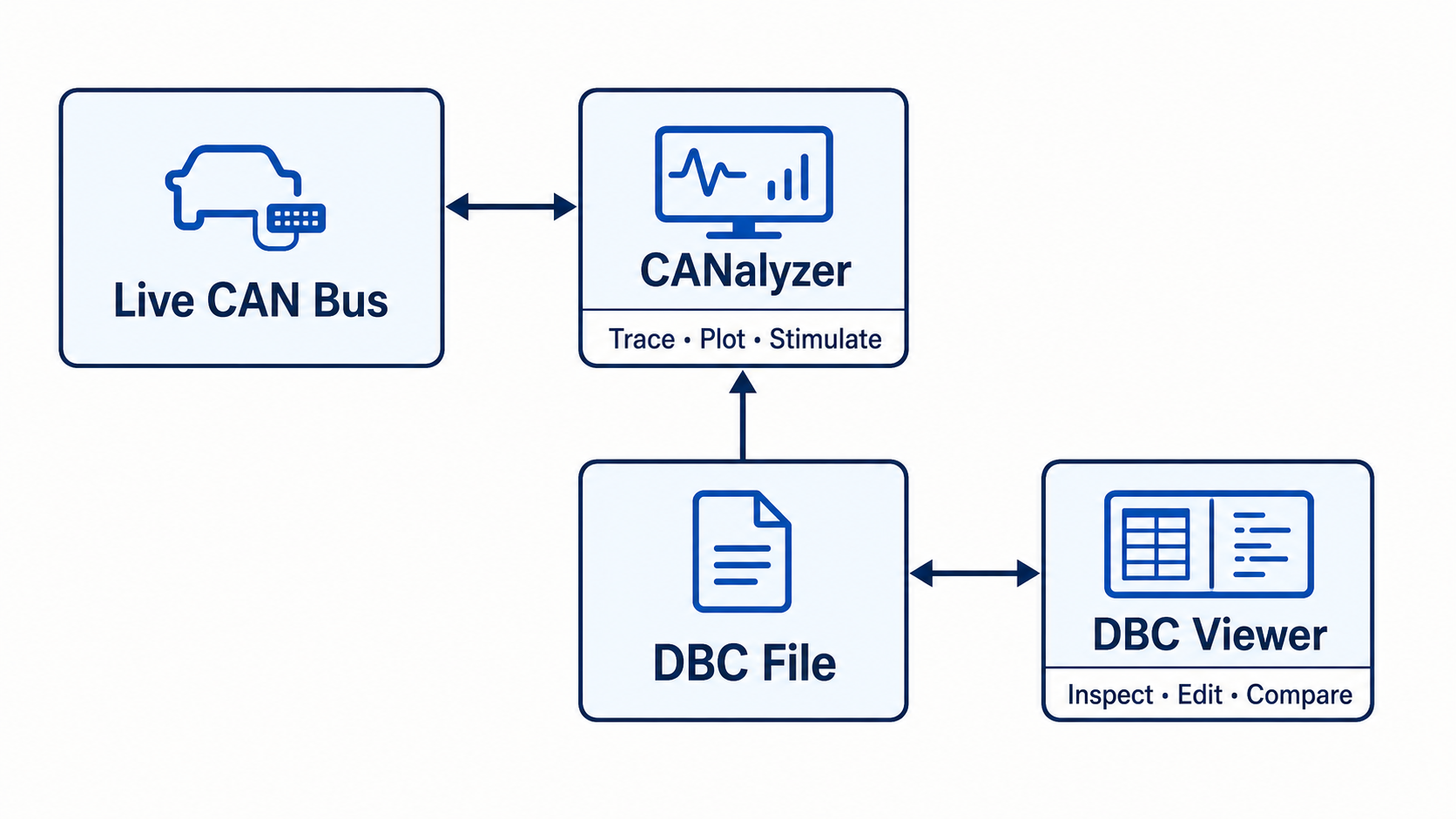
CANalyzer is Vector's software for observing, recording, analyzing, and stimulating communication between ECUs.
Engineers use it during vehicle and ECU development to answer questions such as:
- Is the ECU sending the expected message?
- Is a signal changing at the correct time?
- Are messages missing or arriving too slowly?
- What happens if a test message is sent?
- Does an ECU respond to a diagnostic request?
CANalyzer is a product name. A CAN analyzer is the general name for this type of tool.
You may also see the British spelling CAN analyser. When the word is written as CANalyzer, it normally refers to Vector's product.
What CANalyzer can do
The exact functions depend on the installed edition, options, hardware, and licenses. Common CANalyzer work includes:
- viewing live network traffic
- recording bus logs
- filtering messages
- displaying decoded signal values
- plotting signals
- replaying recorded traffic
- sending or stimulating messages
- running diagnostic requests
- using CAPL for programmable analysis
- working with CAN and other supported vehicle networks
It is designed for more than simply opening a DBC file.
A typical CANalyzer workflow
- Connect supported network hardware to the computer.
- Select the hardware channel and bus settings.
- Add the correct database, such as a DBC file.
- Start the measurement.
- Watch raw frames in a trace window.
- Filter the IDs or signals you care about.
- Record, plot, diagnose, or stimulate as needed.
The database is important because it turns raw frames into message names and physical signal values.
CANalyzer vs DBC viewer
These tools overlap, but they solve different main problems.
| Task | CANalyzer | Focused DBC viewer |
|---|---|---|
| Open and inspect a DBC file | Yes | Yes |
| View live CAN traffic | Yes | Usually no |
| Record CAN logs | Yes | Usually no |
| Send and stimulate messages | Yes | Usually no |
| Plot live signals | Yes | Usually no |
| Inspect message and signal definitions | Yes | Yes |
| Edit or compare DBC revisions | Depends on tool setup | Often a core workflow |
| Setup complexity | Broader engineering environment | Smaller database-focused workflow |
Choose based on the job, not the number of features.
When CANalyzer makes sense
CANalyzer is a strong fit when you need to work with a live ECU or network. It is especially useful when the task involves timing, logging, replay, diagnostics, stimulation, or several vehicle-network technologies.
Example:
Problem: The dashboard sometimes misses an engine-speed update.

Useful work:
1. Record the live bus.
2. Filter the engine-speed message.
3. Check its cycle time.
4. Plot the decoded value.
5. Compare the missing update with other network events.
That is a live analysis problem, not only a database problem.
When a DBC viewer makes more sense
A focused DBC viewer is often enough when you need to:
- inspect a DBC from a supplier
- find a CAN ID or signal
- review scaling and byte order
- check multiplexed signals
- edit message definitions
- compare two DBC revisions
- work without connecting network hardware
Example:
Problem: EngineSpeed decodes to the wrong value in our software.

Useful work:
1. Open the DBC.
2. Find EngineSpeed.
3. Check start bit, length, byte order, scale, and offset.
4. Compare the DBC with the software decoder.
CANalyzer vs CANoe
This is another common search. In simple terms, CANalyzer is strongly centered on analysis and stimulation. CANoe is commonly used for broader development, simulation, testing, and system integration workflows.
The product boundaries and available options change over time, so check Vector's current documentation before choosing a license or configuration.
Can CANalyzer decode a DBC file?
Yes. A DBC database can provide CAN message and signal definitions so the tool can display names and physical values instead of only raw IDs and bytes.
A DBC file does not contain the live frames. It tells the tool how to interpret them.
Where DBC Utility fits
DBC Utility is not a replacement for every live-network feature in CANalyzer. It is a focused desktop tool for viewing, editing, comparing, and validating DBC files.
Use CANalyzer or another bus-analysis tool when the main work is on the live network. Use DBC Utility when the main work is the database itself. Many teams can use both in the same workflow.
The simple summary
CANalyzer is a professional ECU and network analysis tool from Vector. It can observe, record, decode, stimulate, and diagnose network communication. A DBC viewer has a narrower job: make the CAN database easy to inspect and maintain. Pick the tool that matches the problem in front of you.