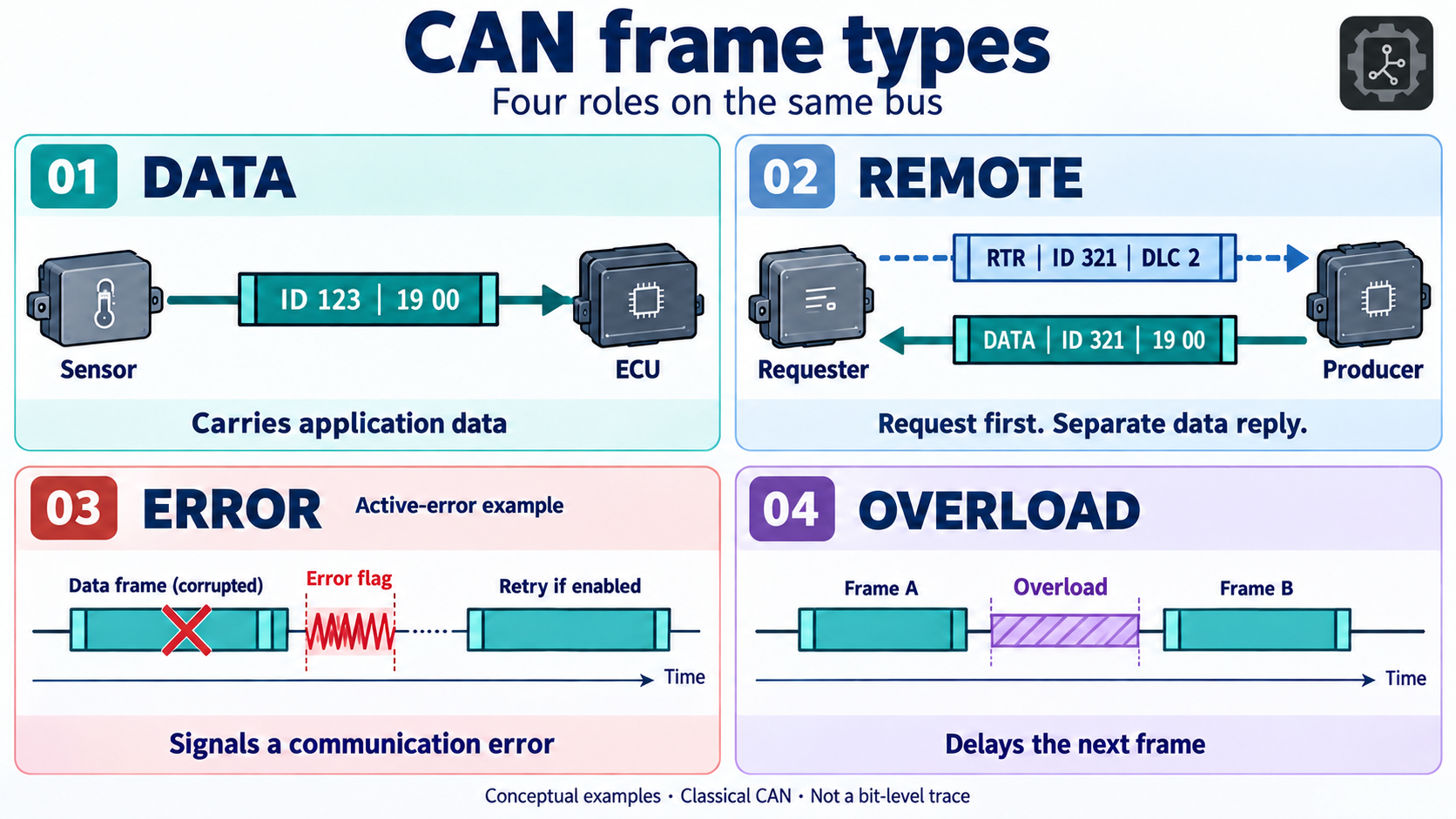
Open a CAN recording and most lines look reassuringly similar: a time, an identifier, and some hexadecimal bytes. It is tempting to treat every line as a measurement waiting to be decoded. That works until you meet a remote request with no bytes, an error report with eight bytes that are not application data, or a tool that calls an 11-bit message a “standard frame.”
These are different questions hiding behind the word frame. Before asking what a payload means, ask what kind of event you captured.
Classical CAN has four frame types: data, remote, error, and overload. Data frames carry application information. Remote frames request a corresponding data frame. Error frames signal a detected communication error. Overload frames signal an overload condition and delay the next data or remote frame. You will encounter these in different ways because a normal CAN adapter does not expose every bit on the wires as a log entry.
This guide explains the distinction, works through annotated captures, and gives you a small lab you can repeat without a vehicle. The examples use Classical CAN and CAN FD; CAN XL needs additional format handling and is outside this walkthrough.
Start with three separate questions
Imagine a temperature sensor talking to a display. “The temperature is 25 degrees” is a data message. “Please send the temperature” could be a remote request on a network designed to use one. A communication error or a request to delay the next transmission belongs to the operation of the bus itself.
Now consider the message's identifier and transport format. They describe other properties:
| Question | Possible answers | Where to look |
|---|---|---|
| What is this frame doing? | Data, remote request, error signaling, overload signaling | Frame-type flags, error events, or a protocol-aware bit trace |
| How long is its identifier? | Standard/base: 11 bits; extended: 29 bits | IDE on the wire; an extended-ID flag in software |
| Which data-frame format is used? | Classical CAN or CAN FD in this guide | FDF on the wire; an FD flag in software |
A flag is a small piece of yes-or-no metadata, such as “this is a remote request.” A byte holds eight bits, and logs commonly write each byte as two hexadecimal digits. Hexadecimal uses 0 through 9 and A through F, so 1F is one byte with decimal value 31. The prefix 0x simply tells you that a number is written in hexadecimal; it is not part of the transmitted data.
A message can therefore be a 29-bit Classical CAN data frame or an 11-bit CAN FD data frame. “Extended” does not mean “remote,” and “FD” does not mean “error.” Both standard and extended identifiers are available for Classical CAN data and remote frames.
There is also an important exception: CAN FD does not have remote frames. A controller configured for CAN FD may still support Classical CAN traffic, but that does not turn a Classical remote request into an FD remote request. The CiA explanation of CAN FD describes the format distinction.
1. Data frames: the messages carrying useful values
A data frame is the everyday delivery mechanism for measurements, commands, statuses, and higher-level protocol messages. A motor controller might send its speed every ten milliseconds. A switch might send only when its state changes. Both are data frames.
For a Classical CAN data frame, the data field can contain zero to eight bytes. A zero-byte data frame is valid, so an empty payload does not identify a remote frame. The RTR flag makes that distinction.
Consider this illustrative compact candump log line:
(0.010000) can0 123#401F000000000000The timestamp is 0.010000 seconds in this example. can0 is the captured interface. 123 is hexadecimal identifier 0x123. The # separates the identifier from the data. The sixteen hexadecimal digits after it represent eight bytes:
40 1F 00 00 00 00 00 00Suppose a fictional motor's message definition says the first two bytes are an unsigned, little-endian speed value with a scale of 0.25 rpm per count. “Little-endian” means the least significant byte comes first. The calculation is:
raw value = 0x1F40 = 8000
motor speed = 8000 × 0.25 = 2000 rpm
The speed calculation comes from that example message definition, not from CAN itself. Another network could use identifier 0x123 for a door switch and interpret those same bytes differently. A DBC file often supplies the signal layout, scale, and units.
DLC means Data Length Code. For Classical CAN, codes 0 through 8 correspond to that many data bytes; higher raw codes still represent eight data bytes. CAN FD uses the higher codes for longer payloads: code 9 means 12 bytes, for example, and code 15 means 64. Many software tools show the resulting byte count rather than the raw four-bit code, so check what a column labeled “DLC” actually contains.
On the wire, the simplified order for an 11-bit Classical data frame is:
Start → identifier + RTR → control + DLC → data → CRC → ACK → endThe controller handles much of this structure. Most adapter logs show the identifier, flags, and payload; they do not print the CRC bits, acknowledgment slot, or inserted stuff bits. A successful-looking log row is not a complete view of the electrical exchange.
How to identify a data frame
In a trace viewer, inspect its type, RTR, and error flags. A valid Classical data frame has RTR clear. In python-can, ordinary data messages have is_remote_frame=False and is_error_frame=False; is_fd then tells you whether the data frame uses CAN FD.
For compact can-utils logs, compare:
123#11223344     Classical data frame, four bytes
123#             Classical data frame, zero bytes
123#R4           Remote request, requesting four bytes
That final line is a different frame type even though it uses the same identifier. The distinction is in the request marker, not in the identifier's numerical value.
2. Remote frames: a request with no data field
A Classical CAN remote frame asks for a data frame with the corresponding identifier. Think of a display asking a sensor to publish its current reading. A remote request has an identifier and a DLC, but no data field.
RTR stands for Remote Transmission Request. In Classical CAN, its on-wire value is recessive for a remote frame and dominant for a data frame. In software, tools normally expose a boolean flag or an RTR label, so you do not need to inspect voltages to tell the two apart.
Those electrical terms describe the two logical bus states: dominant represents 0; recessive represents 1. If one node sends dominant while another sends recessive, the bus reads dominant. This is how CAN can resolve competing transmissions bit by bit. It also explains the arbitration result below without needing to memorize a waveform.
Here is an illustrative exchange on a network designed to support remote requests:
(0.100000) can0 321#R2
(0.101000) can0 321#1900
The first line requests a two-byte data frame using identifier 0x321. The second is a separate data frame with the same identifier and two bytes, 19 00. The responding node does not insert bytes into the original remote request; it transmits a new frame.
The remote frame's DLC describes the requested length, not the number of bytes attached to that request. That is why a tool can show DLC 2 while the remote request contains no payload. A responder must be configured to provide that data; sending an RTR does not oblige every ECU to answer.
Remote frames exist in Classical CAN but are uncommon in many modern applications. Periodic publishing or higher-level request messages often serve the same application need. Whether your particular device supports RTR is a question for its protocol description, not something to infer from its ability to receive ordinary data.
How to recognize a remote request in a capture
In compact can-utils syntax, 321#R2 means a remote request with requested DLC 2. The normal, spaced candump display uses the words remote request. In python-can, check msg.is_remote_frame; do not infer the type from len(msg.data).
A related trap is treating every request/reply exchange as a remote frame. A UDS VIN request is carried inside CAN data frames using ISO-TP. It is an application-level request with data bytes, not a Classical CAN RTR request.
If a remote and data frame compete with exactly the same identifier and identifier format, the data frame wins at the RTR bit. Losing that arbitration is normal bus behavior, not a damaged frame.
3. Error frames: communication failed, not an ECU fault code
An error frame belongs to CAN's communication checks. It is not a normal message whose identifier happens to mean “error.” An ECU reporting a failed temperature sensor may send that diagnosis in an entirely valid CAN data frame. An on-wire CAN error frame indicates a problem in the communication process itself.
For example, suppose the transmitter sends a frame, but no other active node acknowledges it. It detects an ACK error. A receiver could instead detect a CRC mismatch, an invalid frame structure, or a bit-stuffing violation. These are reasons to investigate the bus, its configuration, and the participating controllers.
An error frame consists of an error flag and an error delimiter. A node in the error-active state sends a flag of six dominant bits. A node in the error-passive state sends six recessive bits instead. The delimiter is eight recessive bits. Multiple nodes' flags can overlap, so a waveform does not always look like one isolated six-bit flag.
The passive distinction matters: recessive bits cannot overwrite another node's dominant transmission. An error-passive node's error flag does not disturb an otherwise valid frame in the same way as an active error flag. You cannot assume that every locally detected error becomes an obvious bus-wide interruption.
With normal automatic retransmission enabled, a transmitter attempts a failed message again when allowed by the protocol. Controllers also maintain error counters and can move from error-active to error-passive and eventually bus-off. Retry settings and error-state rules matter; “errors always cause endless retries” is not a sound diagnostic assumption. See the error-frame and bus-off guide for that workflow.
What an error row in SocketCAN actually represents
An on-wire error frame has no application CAN identifier and no application payload. Linux nevertheless needs a structured way to tell a program what the controller or driver detected. SocketCAN uses an Error Message Frame: a software record with error-class flags and diagnostic bytes.
For example, this is a synthetic SocketCAN ACK-error report in compact can-utils syntax:
(0.200000) can0 20000020#0000000000000000In that field, 0x20000000 is CAN_ERR_FLAG, which marks the record as an error report. 0x00000020 is CAN_ERR_ACK, the “no ACK received” class. Their combination is 0x20000020. The eight following bytes are diagnostic storage in the Linux error-report format, not eight sensor values transmitted by an ECU.
Do not interpret this row as a 29-bit application message named 0x20000020, or feed its bytes into a DBC signal decoder. Other drivers may report additional error-class bits and details; this minimal example is for reading the format. The definitions come from the Linux CAN error header.
This distinction also prevents false conclusions. One driver event is not necessarily one complete on-wire error sequence. Some reports describe controller-state changes, local buffer problems, or recovery. The absence of reported errors does not prove a clean bus if your adapter cannot expose them or your capture did not request them.
4. Overload frames: delay at the protocol level
An overload frame tells the network about an overload condition and delays the next data or remote frame. It does not carry a temperature, a request identifier, or bytes for a DBC to decode. Its structure resembles an active error frame: a six-dominant-bit flag followed by an eight-recessive-bit delimiter.
Historically, a receiver could use overload signaling because it needed extra processing time. Certain unexpected dominant bits at frame boundaries can also trigger an overload condition. That is why “the bus is busy” is not enough to diagnose an overload frame, and why saying that modern controllers can never generate one would be too strong.
Overload frames are unusual in ordinary modern captures. If you are starting with a healthy bench network, expect to spend far more time looking at data frames than trying to find an overload event.
The important distinction from an error frame is protocol context. An overload condition delays subsequent traffic; an active error flag signals a fault in the exchange. Their flags can look alike, so the position relative to the preceding frame, its ending, and the interframe sequence matters.
Why you usually cannot spot one in an ID-and-data log
Ordinary adapter logs generally do not preserve the bit timing and boundary context needed to identify a physical overload sequence. There is no universal 123#OVERLOAD row to look for. To establish what happened on the wire, use a CAN-aware oscilloscope or logic analyzer with suitable acquisition hardware and a decoder that explicitly supports overload recognition.
Some controllers and drivers can expose an overload-related protocol-error indication. Linux defines CAN_ERR_PROT_OVERLOAD for such reporting. That can be useful evidence, but the report still has the limitations of the hardware and driver; it is not a saved waveform.
A receive-buffer overflow is a different event: your adapter, driver, or application lost incoming records. High bus utilization is another different observation. Neither, by itself, proves that an overload frame was transmitted. When a tool says “overrun” or “overload,” check the exact meaning in that tool's documentation.
The frame and flag definitions are described in the CiA CAN dictionary, especially the error, overload, and remote entries.
Read a mixed CAN capture, one line at a time
The following is a constructed teaching capture, not a recording from a vehicle. The times and application bytes are invented; the syntax follows compact can-utils log format. You can download the sample log. Keeping the syntax explicit matters because other export formats use different type columns and markers.
(0.010000) can0 123#401F000000000000
(0.020000) can0 321#R2
(0.021000) can0 321#1900
(0.030000) can0 00000123#AABB
(0.040000) can0 123#
(0.050000) can0 123##1AABBCCDD
(0.060000) can0 20000020#0000000000000000
Read each row before trying to decode signals:
| Row | Classification | Evidence |
|---|---|---|
123#401F... | 11-bit Classical CAN data, eight bytes | Three-digit ID, one separator, no RTR marker |
321#R2 | 11-bit Classical remote request | R marker; requests two bytes but carries none |
321#1900 | 11-bit Classical CAN data, two bytes | Separate data message corresponding to the example request |
00000123#AABB | 29-bit Classical CAN data, two bytes | Eight-digit ID notation preserves the extended format, even for numerical value 0x123 |
123# | 11-bit Classical CAN data, zero bytes | Empty data field without an RTR marker |
123##1AABBCCDD | 11-bit CAN FD data, four bytes | Double separator identifies FD; the next digit is flags, followed by data |
20000020#0000... | SocketCAN ACK-error report | Error flag plus error-class bits; not an application identifier |
In the FD row, 1 is a flags nibble with bit-rate switching enabled, and AA BB CC DD is the four-byte payload. That flags nibble is not the first payload byte and is not a byte count. Current can-utils may include additional format-marker flag bits in its output; do not require the nibble to be exactly 1 to recognize FD. The double separator is the relevant compact-format marker.
Notice that FD identification cannot rely on length: an FD data frame can carry just four bytes. Nor can extended-ID identification rely only on magnitude: a 29-bit-format frame can have the numerical identifier 0x123. Preserve the format flags when exporting or processing captures.
The compact syntax is defined by the can-utils formatting and parsing implementation. A plain CSV containing only time, ID, and payload may have discarded exactly the flags you need. If that information is missing, report the frame type as unknown rather than guessing from the bytes.
Try data and remote frames without CAN hardware
This lab uses Linux, iproute2, and can-utils. It requires a kernel with virtual CAN support. On Debian or Ubuntu, install the tools:
sudo apt update
sudo apt install can-utils iproute2
Create a virtual CAN interface. If vcan0 already exists, skip the add command:
sudo modprobe vcan
sudo ip link add dev vcan0 type vcan
sudo ip link set dev vcan0 up
In the first terminal, start a readable display:
candump vcan0In a second terminal, send four different examples:
cansend vcan0 123#1122334455667788
cansend vcan0 321#R2
cansend vcan0 00000123#AABB
cansend vcan0 123#
The first terminal should show an eight-byte message, a remote request with requested length 2, an extended-ID message, and a zero-byte data message. Spacing and timestamps depend on tool options. To display the compact syntax used above, stop that display with Ctrl+C and run:
candump -L vcan0Repeat the four send commands. You should see the same identifier-and-data forms as in this article, with current timestamps and interface name vcan0.
The remote request will not automatically produce a reply. Virtual CAN delivers frames between software sockets; it does not create a sensor application. To illustrate the reply, manually send this in the second terminal:
cansend vcan0 321#1900You have now produced a remote request and a separate data reply. This demonstrates the frame formats, not an automatic request handler.
Virtual CAN is useful for checking tools and classifications, but it has no physical wires, transceiver, or real ACK behavior. It cannot validate the wiring, physical error detection, or overload behavior of an actual network. Do not manufacture a physical fault by shorting wires just to create a screenshot.
Capture error reports from a real CAN interface
For this section, can0 must already be configured with the correct bus timing and connected to your bench. If you need that setup first, use the CAN bus setup guide. Choose active or listen-only operation deliberately: a listen-only monitor does not acknowledge frames, and adding an active node can change an otherwise unacknowledged test setup.
To display ordinary traffic and available error reports:
candump -e 'can0,0:0,#FFFFFFFF'The command has three separate jobs. 0:0 accepts normal CAN traffic without restricting its identifier. #FFFFFFFF subscribes to all available error classes. -e asks for readable interpretation of error reports. Using -e alone does not enable error reception. Keep the quoted interface/filter argument together.
For a compact capture file that you can inspect later:
candump -L 'can0,0:0,#FFFFFFFF' > capture.logThis produces compact log format, rather than the explanatory display from -e. Keep the original file when converting to CSV or another format; an exporter may omit error events or format flags.
On hardware that supports it, bus-error reporting can be enabled while configuring an interface with berr-reporting on. For example, on a controlled Classical CAN bench that really uses 500 kbit/s:
sudo ip link set dev can0 down
sudo ip link set dev can0 type can bitrate 500000 berr-reporting on
sudo ip link set dev can0 up
ip -details -statistics link show can0
This reconfiguration interrupts the local interface. It is not a passive inspection command. The bitrate must match the network, and the reporting option may be unsupported by a particular controller or driver. It also does not replace configuring CAN FD timing where required.
If you receive no errors, first check capture settings and hardware support. If you do receive errors, record the interface statistics before restarting it. An ACK error points you toward missing acknowledgment, but it does not by itself identify a broken ECU. Power, bitrate, wiring, transceiver state, and which nodes are active all affect that observation. The candump source and usage and SocketCAN documentation explain filtering and reporting.
Identify received frames in Python
For an application or an AI agent analyzing structured CAN messages, check metadata before decoding data. The order below deliberately checks the error flag first, so an error report cannot slip through as a sensor message.
Install the library version used for this example:
python3 -m venv .venv
source .venv/bin/activate
python -m pip install python-can==4.6.1
Save the following as identify_can_frames.py, or download the script. It reads live SocketCAN messages on an already configured Linux interface. Set USE_FD to True if your interface is configured for CAN FD and you want to receive FD frames too.
import can


INTERFACE = "can0"
USE_FD = False


def classify_frame(message):
    if message.is_error_frame:
        return "ERROR report"
    if message.is_remote_frame:
        return "REMOTE request"
    if message.is_fd:
        return "CAN FD data"
    return "Classical CAN data"


def describe_frame(message):
    kind = classify_frame(message)
    if message.is_error_frame:
        details = message.data.hex(" ").upper()
        return f"{kind} | diagnostic bytes={details}"

    id_format = "29-bit" if message.is_extended_id else "11-bit"
    width = 8 if message.is_extended_id else 3
    identifier = f"0x{message.arbitration_id:0{width}X}"
    if message.is_remote_frame:
        content = f"requested length={message.dlc}; data bytes=0"
    else:
        data = message.data.hex(" ").upper() or "(empty)"
        content = f"data bytes={len(message.data)}; data={data}"
    return f"{kind} | {id_format} | ID={identifier} | {content}"


def main():
    try:
        with can.Bus(
            interface="socketcan",
            channel=INTERFACE,
            fd=USE_FD,
            ignore_rx_error_frames=False,
        ) as bus:
            for message in bus:
                print(describe_frame(message), flush=True)
    except KeyboardInterrupt:
        pass


if __name__ == "__main__":
    main()
For the virtual lab, change INTERFACE to "vcan0" and run:
python identify_can_frames.pyRepeat the send commands from the second terminal. Representative output for the four cases is:
Classical CAN data | 11-bit | ID=0x123 | data bytes=8; data=11 22 33 44 55 66 77 88
REMOTE request | 11-bit | ID=0x321 | requested length=2; data bytes=0
Classical CAN data | 29-bit | ID=0x00000123 | data bytes=2; data=AA BB
Classical CAN data | 11-bit | ID=0x123 | data bytes=0; data=(empty)
The functions also classify python-can CAN FD messages and error reports. They intentionally do not pretend to detect an on-wire overload frame from ordinary message objects: that needs the additional evidence described earlier. For file readers, verify that the reader preserves the original error and frame-format metadata before trusting the same classification. A conversion that dropped those fields cannot be repaired by this function.
The field meanings and SocketCAN options are documented in the python-can Message API and SocketCAN backend.
Mistakes that change the meaning of a capture
A CAN FD frame with ESI set is still a data frame. ESI reports the sender's error-passive state; it does not turn the message into an error frame. Similarly, losing arbitration is normal scheduling, and a repeated ID could be periodic traffic or an application retry. A repeated ID alone does not establish a physical retransmission after an error.
An ACK is not a separate CAN data frame. It is a bit slot within a data or remote frame. It indicates that another participating receiver acknowledged reception; it does not prove that a particular application accepted a command or acted on it.
Finally, payload values are not frame-type markers. Eight zero bytes can be perfectly valid application data. A byte value FF is not a universal error signal. An application may define such meanings, but that is a different layer. Keep frame classification, payload decoding, and application interpretation as three separate steps.
For automated analysis, preserve the timestamp, channel, identifier format, frame type, FD/BRS/ESI flags where present, declared length, and actual data. Label hardware-dependent error evidence and missing metadata explicitly. That gives another person or an agent enough context to reproduce your reasoning.
A reliable way to read your next capture
Start with the capture format and which metadata it retains. Separate error reports from messages carrying application data. For the remaining messages, check RTR, then Classical versus FD format, then 11-bit versus 29-bit identifiers. Only after those checks should you apply a DBC or a higher-level protocol decoder.
If the question is about physical error or overload signaling, confirm that your acquisition tool actually records the necessary events or waveform. A clean-looking spreadsheet of IDs and bytes may simply have filtered out the part of the bus you need to investigate.
Sources and example validation
The explanations and teaching captures in this article were written for this guide. Protocol terminology was checked against CAN in Automation documentation; command syntax and report formats were checked against Linux CAN and can-utils sources. The Python classifier is exercised with constructed messages and virtual-bus delivery. The sample log is synthetic. Physical error and overload behavior needs appropriate hardware and has not been measured by the virtual lab.
- CiA: Classical CAN: frame fields, remote requests, and communication checks.
- CiA: CAN FD: FDF, BRS, ESI, identifier formats, and remote-frame limitations.
- CiA CAN dictionary, 2026 edition: error flags, error delimiters, overload conditions, and frame terminology.
- Kvaser CANlib frame-type documentation: practical handling of data, remote, and error frames.
- Linux SocketCAN documentation: error subscriptions, interface configuration, and capture limitations.
- Linux CAN error definitions: error classes and diagnostic-byte meanings.
- can-utils:
candump,cansend, and compact trace syntax. - python-can documentation: message metadata and the SocketCAN backend; examples tested with 4.6.1.
For conformance work, use the applicable ISO 11898-1 edition and the documentation for your controller, adapter, and higher-level protocol.