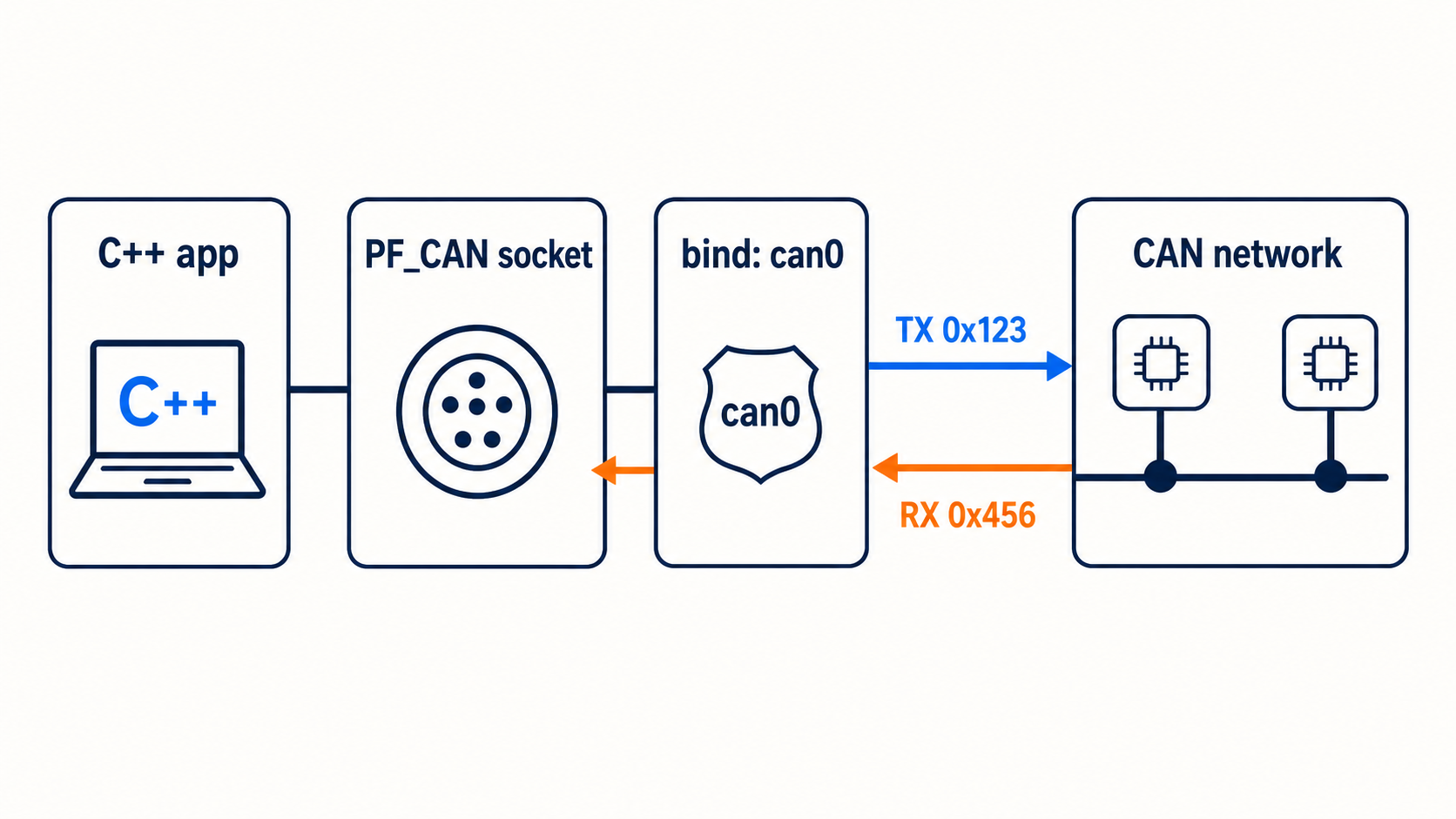
What this C++ example does
The program below:
- Opens a raw CAN socket.
- Finds the Linux interface named
can0. - Binds the socket to that interface.
- Sends one standard CAN frame.
- Waits up to two seconds for a received frame.
- Prints the CAN ID and data bytes.
It uses SocketCAN, the CAN networking API built into Linux.
Configure the interface first
For a physical CAN interface at 500 kbit/s:
sudo ip link set can0 down
sudo ip link set can0 type can bitrate 500000
sudo ip link set can0 up
For a software-only test:
sudo modprobe vcan
sudo ip link add dev vcan0 type vcan
sudo ip link set vcan0 up
If you use vcan0, change the interface name in the code.
Complete C++ SocketCAN example
#include <cerrno>
#include <cstring>
#include <iomanip>
#include <iostream>

#include <fcntl.h>
#include <linux/can.h>
#include <linux/can/raw.h>
#include <net/if.h>
#include <poll.h>
#include <sys/ioctl.h>
#include <sys/socket.h>
#include <unistd.h>

int main() {
    const char* interface_name = "can0";

    int socket_fd = socket(PF_CAN, SOCK_RAW, CAN_RAW);
    if (socket_fd < 0) {
        std::cerr << "socket failed: " << std::strerror(errno) << '\n';
        return 1;
    }

    ifreq interface_request{};
    std::strncpy(
        interface_request.ifr_name,
        interface_name,
        IFNAMSIZ - 1
    );

    if (ioctl(socket_fd, SIOCGIFINDEX, &interface_request) < 0) {
        std::cerr << "Interface lookup failed: "
                  << std::strerror(errno) << '\n';
        close(socket_fd);
        return 1;
    }

    sockaddr_can address{};
    address.can_family = AF_CAN;
    address.can_ifindex = interface_request.ifr_ifindex;

    if (bind(
            socket_fd,
            reinterpret_cast<sockaddr*>(&address),
            sizeof(address)) < 0) {
        std::cerr << "bind failed: " << std::strerror(errno) << '\n';
        close(socket_fd);
        return 1;
    }

    can_frame tx_frame{};
    tx_frame.can_id = 0x123;
    tx_frame.can_dlc = 8;
    tx_frame.data[0] = 0x40;
    tx_frame.data[1] = 0x1F;
    tx_frame.data[2] = 0x00;
    tx_frame.data[3] = 0x00;
    tx_frame.data[4] = 0x01;
    tx_frame.data[5] = 0x00;
    tx_frame.data[6] = 0x00;
    tx_frame.data[7] = 0x00;

    ssize_t written = write(socket_fd, &tx_frame, sizeof(tx_frame));
    if (written != sizeof(tx_frame)) {
        std::cerr << "CAN write failed: " << std::strerror(errno) << '\n';
        close(socket_fd);
        return 1;
    }

    std::cout << "Sent CAN ID 0x123\n";

    pollfd descriptor{};
    descriptor.fd = socket_fd;
    descriptor.events = POLLIN;

    int poll_result = poll(&descriptor, 1, 2000);
    if (poll_result == 0) {
        std::cout << "No frame received in 2 seconds\n";
        close(socket_fd);
        return 0;
    }
    if (poll_result < 0) {
        std::cerr << "poll failed: " << std::strerror(errno) << '\n';
        close(socket_fd);
        return 1;
    }

    can_frame rx_frame{};
    ssize_t received = read(socket_fd, &rx_frame, sizeof(rx_frame));
    if (received != sizeof(rx_frame)) {
        std::cerr << "CAN read failed: " << std::strerror(errno) << '\n';
        close(socket_fd);
        return 1;
    }

    canid_t clean_id = rx_frame.can_id & CAN_EFF_MASK;
    std::cout << "Received ID 0x" << std::hex << clean_id << " data:";
    for (int i = 0; i < rx_frame.can_dlc; ++i) {
        std::cout << ' ' << std::setw(2) << std::setfill('0')
                  << static_cast<int>(rx_frame.data[i]);
    }
    std::cout << '\n';

    close(socket_fd);
    return 0;
}
Compile and run
g++ -std=c++17 -Wall -Wextra -O2 can_example.cpp -o can_example
./can_example
Run candump can0 in another terminal to see the transmitted frame.
Why the program may not receive its own frame
SocketCAN enables local loopback by default, but a raw socket does not normally receive frames sent by that same socket. Another process such as candump can see the frame.
For a receive test, send a second frame from another terminal:
cansend can0 456#AABBCCDDThe C++ program should print the received frame if it is still waiting.
Add a receive filter
Add this before bind() if you only want standard ID 0x456:
can_filter filter{};
filter.can_id = 0x456;
filter.can_mask = CAN_SFF_MASK;

if (setsockopt(
        socket_fd,
        SOL_CAN_RAW,
        CAN_RAW_FILTER,
        &filter,
        sizeof(filter)) < 0) {
    std::cerr << "setsockopt failed\n";
}
Kernel-level filtering reduces work in the application.
Send an extended frame
Set the extended-frame flag:
tx_frame.can_id = 0x18FEEE01 | CAN_EFF_FLAG;When reading, test the flag before choosing the mask:
bool extended = (rx_frame.can_id & CAN_EFF_FLAG) != 0;
canid_t id = rx_frame.can_id & (extended ? CAN_EFF_MASK : CAN_SFF_MASK);
Production improvements
The example is intentionally small. A real application should also handle:
- multiple frames without blocking the main thread
- shutdown while a read is waiting
- receive filters for expected IDs
- error frames
- bus-off recovery policy
- CAN FD if needed
- queue limits and backpressure
- timestamps
- DBC decoding outside the socket layer
The simple summary
SocketCAN makes CAN programming look like normal Linux socket programming. Open a PF_CAN socket, bind it to an interface, and read or write a can_frame. Test first with vcan0, use timeouts, and add filters before moving the code into a larger application.